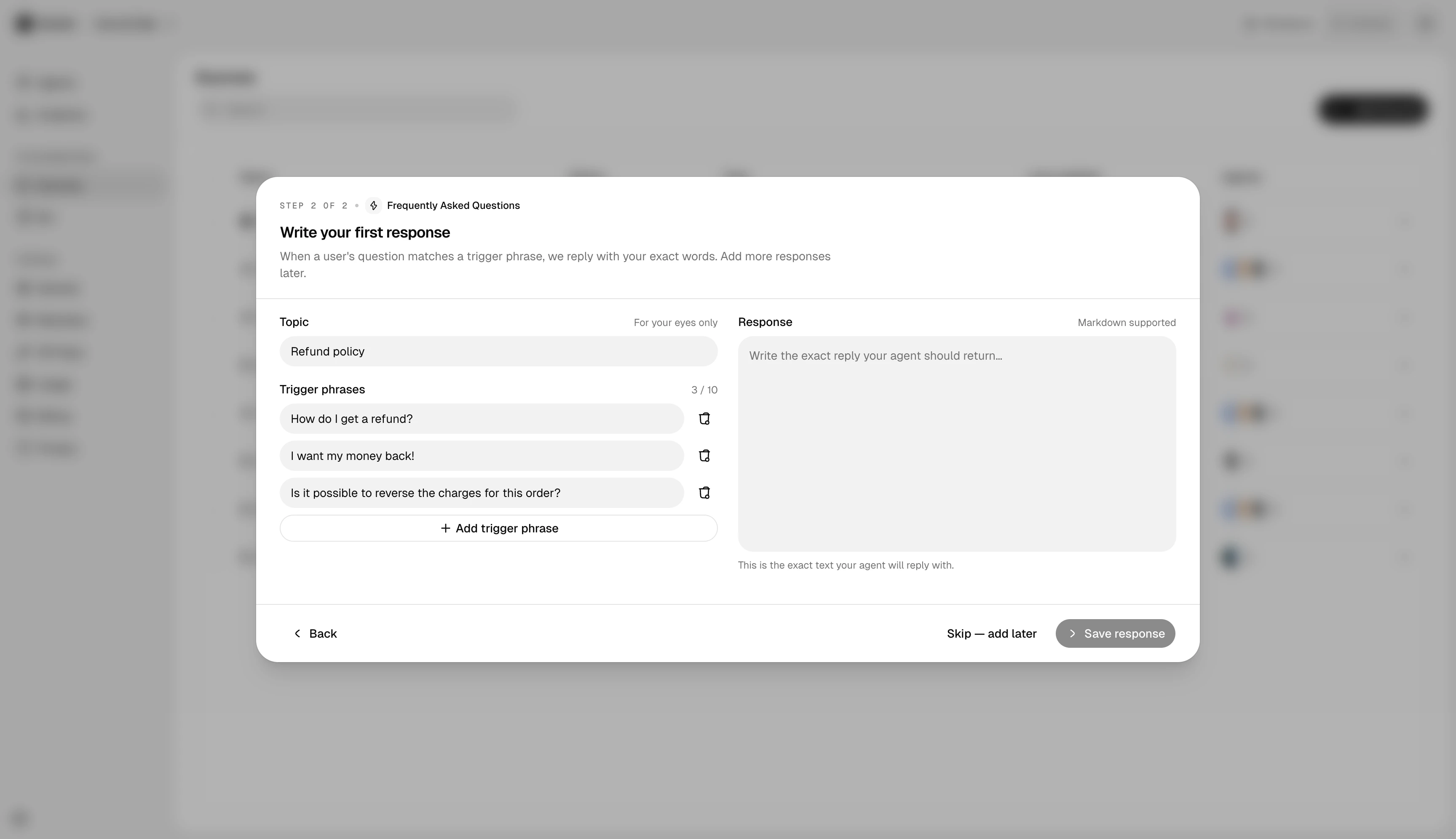
Sometimes the right answer to a question doesn’t exist anywhere yet — it’s tribal knowledge, or it’s a policy decision someone just made. Direct Response is the fastest way to teach the agent without first writing a help-center article.
Add a Direct Response
In a folder, click Add source → Direct Response. The form has two fields:
- Question — phrased the way a real visitor would ask. Don’t worry about every phrasing; embeddings handle paraphrase.
- Answer — the canonical response, in the agent’s voice.
When to use Direct Response vs. a website or file
- Direct Response — short, opinionated, doesn’t need a long-form home. “How do I cancel my account?” → 3-sentence answer.
- Website page or file — content that has multiple sections, screenshots, or examples. The agent answers better when surrounding context is available.
A common pattern: write a Direct Response first to fix the agent today, then promote it to a help-center article later when it’s been stable for a while.
Editing later
Direct Responses are editable in place — no re-ingest required, the change is live within seconds. This is the fastest feedback loop in the knowledge base.
Next steps
- Citations & re-training — confirm the agent prefers your Direct Response over older content.
- Tone and fallbacks — if the agent isn’t picking up tone from your Direct Response, the fix is usually in the persona.