The Playground is the agent’s main page in the console. It’s both a working test surface (chat with the agent on the right) and the configuration cockpit (four tabs on the left). Edits to any tab apply immediately — no save-and-reload, no redeploy.
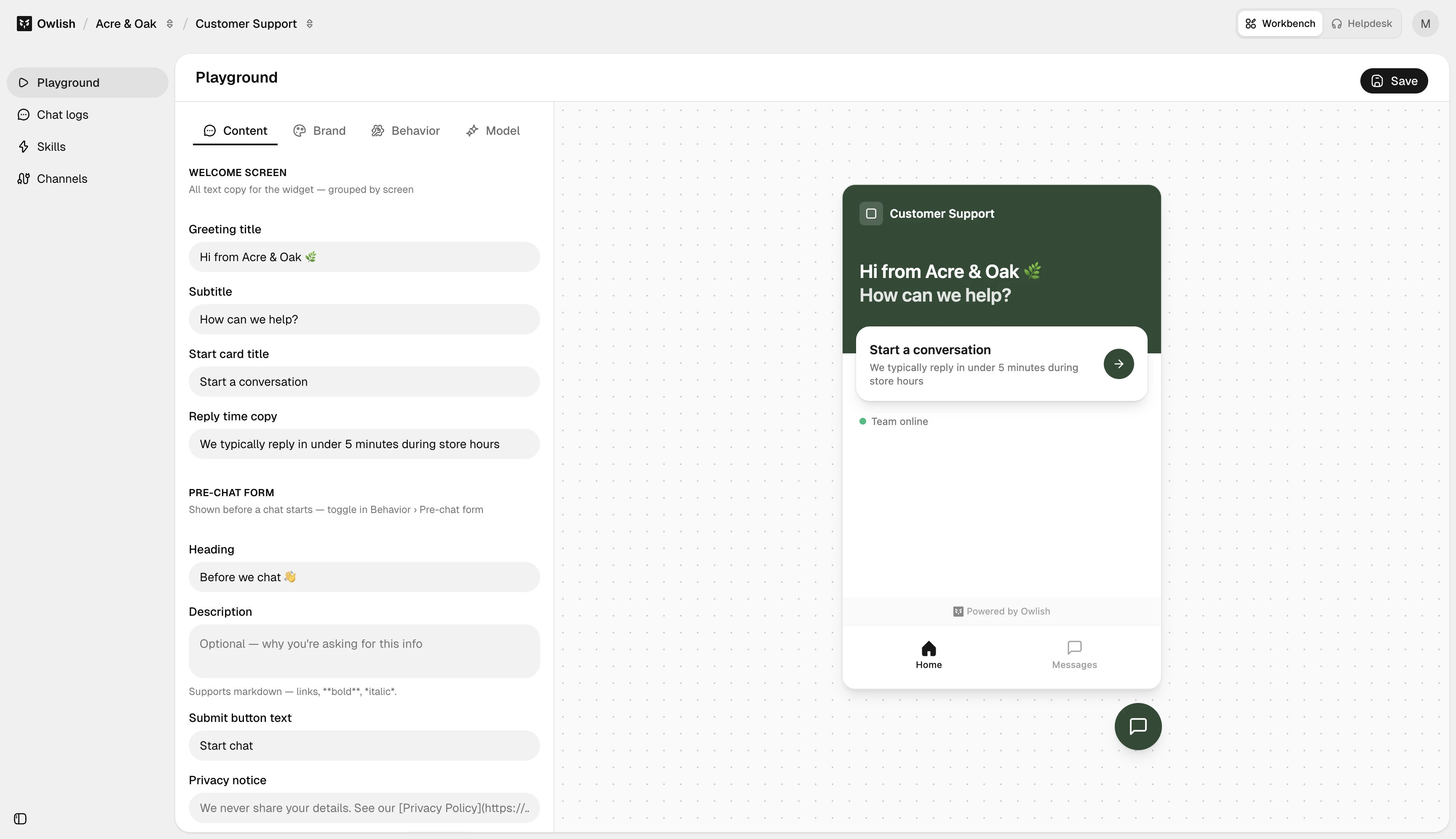
The four tabs
Content
What the visitor sees:
- Greeting — the title and subtitle shown when the widget opens.
- Start card — title and reply-time copy at the top of a fresh chat.
- Display name — what the agent calls itself in the chat header.
- Initial messages — what the agent says first, before the visitor types.
- Suggested messages — up to 4 clickable prompt chips.
- Message placeholder — the input field’s grey-text hint.
- Prechat form — heading, description, fields, submit button, privacy notice. Toggle on under Behavior if you want to collect info before the chat starts.
- Dismissible notice — banner across the top of the chat (e.g., business hours).
Brand
Visual:
- Theme — light, dark, or auto.
- Profile picture — agent’s avatar.
- Launcher icon and launcher background color — the floating bubble on your site.
- Primary color — used for visitor-side bubbles, the send button, and accents.
- Launcher alignment — left or right.
- Button label — text shown next to the bubble (or none).
- Show launcher icon toggle.
Behavior
How the agent acts:
- Show start card / messages tab — toggles for the chat surface chrome.
- Prechat: enable, require, allow skip, per-field toggles.
- Show reply time — display “usually replies within X minutes”.
- Show team status — surface online/offline state.
- Stream responses — token-streamed replies vs. send-when-done.
- Allow attachments — file uploads from the visitor.
- Collect feedback — thumbs up/down on agent replies.
Model
Generation:
- Model picker — grouped by provider (Google, Anthropic, OpenAI). Pick whichever fits cost/latency/quality for your case.
- Temperature — 0–2 slider. Lower = more deterministic; higher = more varied.
- Instructions — the system prompt / persona, with a character counter. This is where you tell the agent who it is, what to do under uncertainty, and any hard rules. See Tone and fallbacks.
Testing in the right panel
The chat panel is a real conversation against the same runtime your live channels use — same model, same knowledge, same Instructions. Conversations here don’t count against your billable session quota.
A short checklist for every Instructions change:
- Citations. Every grounded answer should cite a source.
- Tone. Sound like the persona on the Model tab? If not, edit Instructions.
- Refusals. Ask something the agent shouldn’t know — it should refuse cleanly.
- Latency. Streaming should start within a second or two.
Next steps
- Tone and fallbacks — write good Instructions.
- Customize the widget — most of the customization sits on the Content / Brand / Behavior tabs above.