Widget customization in Owlish lives on the agent’s Playground page, not on the Channels page. The Playground has four configuration tabs; three of them shape what visitors see in the widget. Channels only handles plumbing (allowed domains, citation toggle).
Where each setting lives
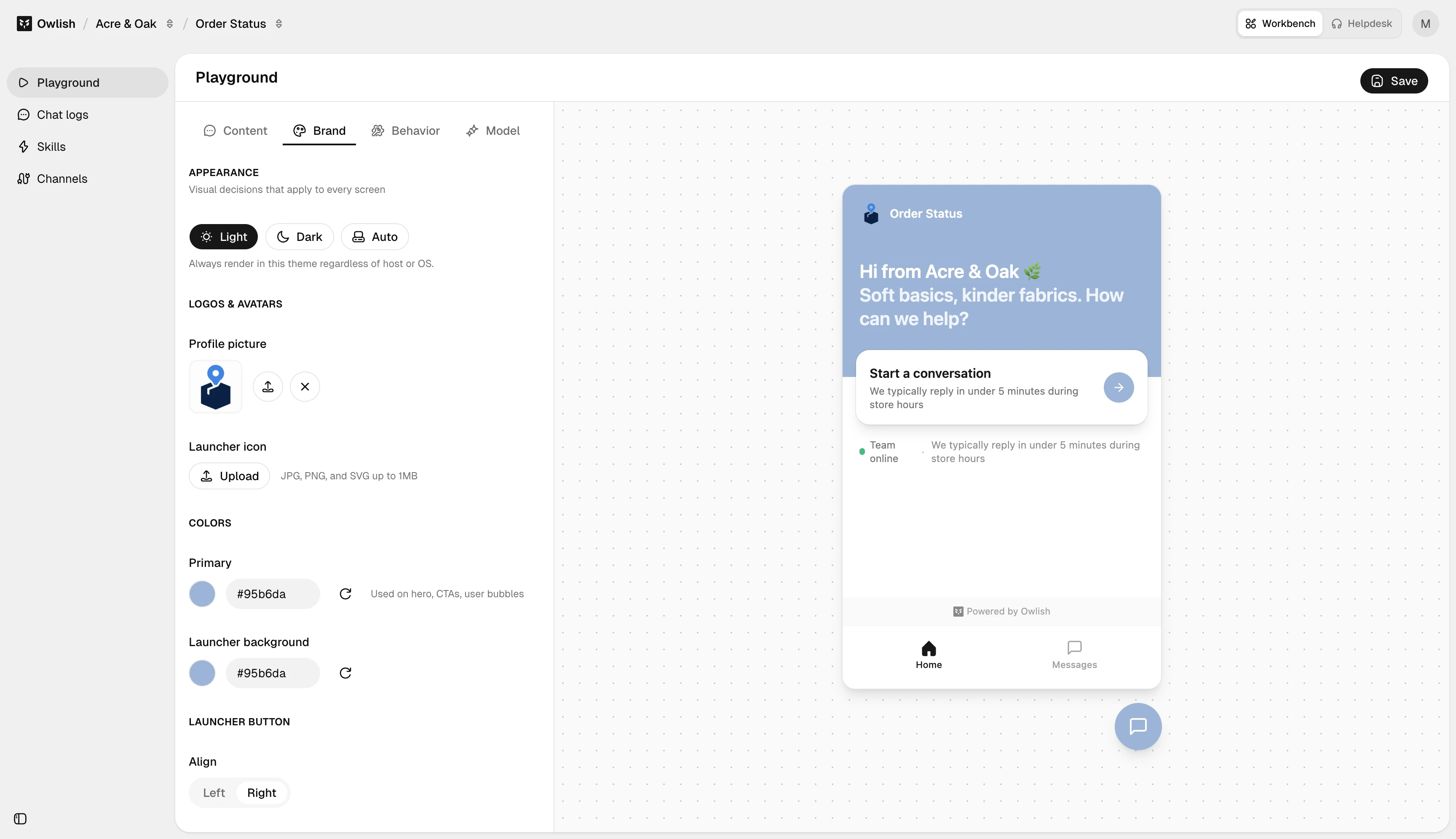
Brand tab — visual identity
- Theme — light, dark, or auto.
- Profile picture — the avatar shown next to agent messages and in the widget header.
- Launcher icon and launcher background color — the floating bubble that opens the chat.
- Primary color — used on visitor-side bubbles, the send button, and accent highlights.
- Launcher alignment — bottom-left or bottom-right.
- Button label — optional text next to the bubble (e.g., “Chat with us”).
- Show launcher icon toggle.
Content tab — copy
- Greeting — title + subtitle shown when the widget opens.
- Start card title and reply-time copy.
- Display name — the agent’s name shown in the header.
- Initial messages — what the agent says before the visitor types.
- Suggested messages — up to 4 clickable prompt chips. Pick high-intent questions, not “tell me about your company.”
- Message placeholder — input field hint.
- Prechat form — heading, description, fields, submit button text, privacy notice (only shown if prechat is enabled — see Behavior tab).
- Dismissible notice — banner at the top of the chat (e.g., business hours).
Behavior tab — toggles
- Show start card / Show messages tab — chrome toggles.
- Prechat: enable, require, allow skip, per-field toggles.
- Show reply time — surface “usually replies within X minutes”.
- Show team status — show whether operators are online.
- Stream responses — token streaming vs. wait-for-complete.
- Allow attachments — visitor file uploads.
- Collect feedback — thumbs up/down on agent replies.
Channels page — security plumbing
Two settings stay on Channels → Web widget (not the Playground):
- Allowed domains — domain allowlist for embedding.
- Citation config — whether citations show in the widget.
See Web widget for those.
Workflow
A typical first-time customization:
- Brand tab — set theme, primary color, profile picture, launcher color.
- Content tab — write the greeting, suggested questions, and prechat copy.
- Behavior tab — enable prechat, attachments, feedback per your use case.
- Test in the right panel of the Playground.
- Open Channels → Web widget, set Allowed domains, copy the embed.
Next steps
- Web widget — embed and domain settings.
- Tone and fallbacks — Instructions on the Model tab control voice and refusal behavior.