How to Set Up AI Customer Support on WhatsApp
A practical guide to running an AI support agent on WhatsApp: the Business Platform rules, the 24-hour service window, grounded answers, and human handoff.
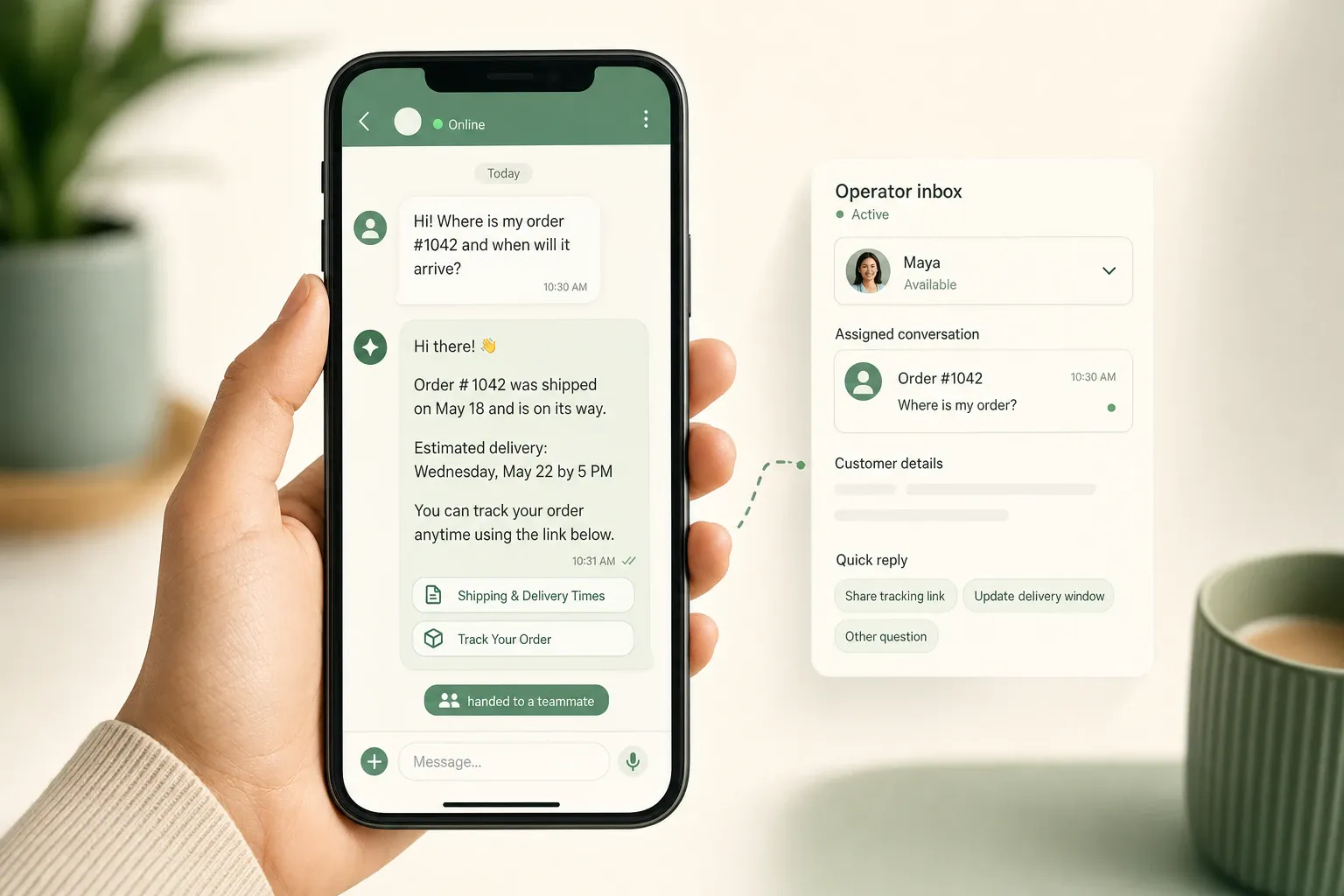
WhatsApp is where many of your customers already message, so an AI support agent there can answer in seconds instead of leaving people waiting on email. But WhatsApp is not a website widget with a green coat of paint. It has a metered messaging model, a strict 24-hour reply window, and templates you have to get approved before you can send certain messages. Get those rules wrong and your “always-on” support bot either goes quiet at the worst moment or starts costing money on every outbound nudge.
This guide explains how to set up AI customer support on WhatsApp the right way: the platform mechanics you have to plan around, how the agent should behave inside the service window, how to keep answers grounded, and when to hand off to a person. The first half is tool-agnostic. The second half covers where Owlish fits, because Owlish is our product.
WhatsApp support is customer-facing, so the rules are stricter
A Slack or Microsoft Teams support bot usually talks to your own team. If it gives a clumsy answer, an employee shrugs and rephrases. WhatsApp is the opposite end of the business. The person on the other side is a customer, often mid-purchase or mid-problem, and they treat the thread like a personal conversation.
That raises the stakes in three ways:
- Tone is personal. People expect a reply that reads like a helpful human, not a form letter. A wrong or robotic answer on WhatsApp feels more like a brand failure than the same answer in a web widget.
- The channel is metered. Unlike your website widget, WhatsApp messaging has real per-message costs and rules about when you can message someone. You cannot spray follow-ups for free.
- Mistakes travel. A customer can screenshot a bad WhatsApp answer and post it anywhere. Accuracy and a clean handoff matter more here than almost anywhere else.
So before you think about the model, you need to understand the platform you are deploying into.
Understand the WhatsApp Business Platform before you connect a bot
Two things people conflate: the WhatsApp Business app (a free phone app for very small businesses, one device, manual replies) and the WhatsApp Business Platform (the API that lets software like an AI agent send and receive messages at scale). Automated support runs on the Platform, not the app.
The Platform’s modern path is the Cloud API, Meta’s hosted implementation. Meta sunset the older self-hosted On-Premises API in 2025, so any new build should assume Cloud API. (Meta: WhatsApp Business Platform pricing)
To go live, you generally need:
- A Meta Business account and business verification.
- A dedicated phone number for WhatsApp (one a person isn’t already using in the consumer app).
- A WhatsApp Business Account (WABA) and an app with Cloud API access.
- Cloud API credentials — an access token, an app secret, the phone number ID, and a webhook verify token — so your support software can receive incoming messages and reply.
This onboarding has more friction than dropping a <script> tag on your site. Business verification and number registration can take anywhere from a few hours to a few days depending on how clean your business records are. Budget for it, and don’t promise a same-day WhatsApp launch to stakeholders.
The 24-hour service window changes how your AI agent should behave
This is the single most important rule, and it’s where most WhatsApp support plans go wrong.
When a customer messages you, a 24-hour customer service window opens. While that window is open, you can reply freely with normal messages, and those replies are not billed as a separate WhatsApp conversation fee. (Meta: pricing) This is exactly the mode an AI support agent should live in: the customer asks, the agent answers, the customer follows up, the timer resets.
Outside that window, you can’t just send a free-form message. Business-initiated messages sent after 24 hours of silence must use a pre-approved template, categorized by Meta as marketing, utility, or authentication. (Meta: template messages)
What this means in practice for support:
- Reactive support is the natural fit. An AI agent that answers when customers message you lives inside the free service window. This is the safest, cheapest, and most useful place to start.
- You can’t have the bot chase people for free. “Just following up — did that fix it?” a day later is a business-initiated message and needs an approved template.
- Pricing shifted to per-message. In July 2025, Meta moved away from charging per 24-hour conversation and toward charging per template message, priced by category and by the recipient’s country. User-initiated service replies inside the window remain the inexpensive path; outbound templates are where the meter runs. (Meta: pricing)
The design lesson: build the AI agent to be an excellent responder, not an outbound nag. Let it resolve questions while the window is open, and reserve templates for genuinely useful, customer-expected messages like an order update or an appointment reminder, not generic re-engagement.
Train the agent on what customers actually ask, not your whole site
A WhatsApp support agent is only as good as the sources behind it. Dumping your entire website into it produces confident answers built on marketing copy and stale pages.
Start from the questions, not the content. Pull the last few hundred WhatsApp or email conversations and group them by intent. On WhatsApp specifically, the high-volume intents tend to be short and transactional:
- “Where’s my order?”
- “What’s your return policy?”
- “Do you ship to [country]?”
- “How do I change my booking?”
- “Is this in stock?”
- “What are your hours?”
Then attach a trusted source to each intent: help-center articles, shipping and returns policies, product docs, booking and cancellation rules, and short direct answers for the questions that don’t live in any document yet. Keep one clear answer per topic, put exceptions next to the rule they modify, and date anything time-sensitive.
This is the part vendors across the category agree on. SiteGPT’s customer-support guide and Chatbase’s customer-service guide both frame source quality and clear automation boundaries as core setup work, not an afterthought. (SiteGPT) (Chatbase) On WhatsApp the point is sharper, because the answer goes straight to a customer with no operator reviewing it first.
Ground every answer, and make the source checkable
The fastest way to lose trust on WhatsApp is a confident wrong answer about a refund, a delivery date, or a price. The fix is grounding: the agent should answer from a retrieved source, and it should be able to show which one.
On a website widget, grounding can render as tidy citation chips under the answer. WhatsApp is plain conversational messaging, so the same grounding shows up differently. A grounded WhatsApp reply looks more like this:
Orders usually ship within 2 business days, and you’ll get a tracking link by email once it’s on the way. If it’s been longer than that, send me your order number and I’ll get a teammate to check.
Source: Shipping & delivery policy
That is better than a bare “it’ll ship soon,” because the answer is tied to a real policy you can point to, and the agent stops at the edge of what it actually knows. Set citation expectations by risk:
- Always ground answers about pricing, refunds, shipping timelines, cancellations, warranties, and anything that touches money or a promise.
- Usually ground answers about product behavior, setup steps, and policies.
- Don’t force a source onto greetings, acknowledgements, or “let me get someone for you” handoff lines.
The goal isn’t decoration. It’s that when the agent is wrong, you can trace the answer to a source and fix the source, instead of guessing why the bot said something odd.
Design handoff for a channel customers treat as personal
Every WhatsApp support agent needs clear stop rules. It should hand off to a human when:
- it can’t find a relevant source for the question;
- the source is stale or contradicts itself;
- the request involves account-specific details, payments, or personal data;
- the issue is a complaint, a cancellation dispute, or anything with legal or safety weight;
- the customer asks for a person;
- the agent has already failed to clarify once or twice.
Handoff on WhatsApp has a timing wrinkle that web chat doesn’t. Because of the 24-hour window, a customer who waits hours for a human reply may fall outside the free window by the time an operator responds, which then requires a template to reconnect. So speed matters: route to a person while the conversation is still warm, and make sure the operator can see the full thread immediately.
A good handoff packet carries:
- the customer’s question,
- the source the agent used or the reason it had none,
- what the agent already told them,
- the customer’s last message,
- any risk flags,
- the recommended next step for the human.
Don’t make the operator scroll the whole transcript to figure out what happened. Hand over a short summary, keep the full history available, and reply before the window closes.
Start narrow, then expand
Resist the urge to point the agent at every intent on day one. Pick a handful of high-volume, low-risk questions where you have a clean source — order status, returns, hours, shipping regions — and let the agent own those. Mark the risky ones (billing disputes, account changes, anything legal) as handoff-only from the start.
Intercom’s guidance on planning for an AI-first support model makes the same point at the team level: build your plan around what automation can safely handle, prove it on a narrow slice, and don’t cut human capacity before the automation has earned it. (Intercom) On WhatsApp, “narrow slice” also keeps your template and messaging costs predictable while you learn what customers actually send.
Measure resolved conversations, not message volume
WhatsApp makes message counts easy to see, which makes them a tempting and weak success metric. A chatty bot that sends more messages is not a better bot.
Track outcomes instead:
- conversations the agent fully resolved without a human;
- repeat questions that disappeared after you fixed a source;
- handoffs caused by genuinely missing knowledge;
- late handoffs where the agent should have stopped sooner;
- answers customers acted on versus answers they ignored or re-asked;
- how often a conversation slipped outside the 24-hour window before a human replied.
Read the first two weeks of conversations by hand. Look for the agent citing the wrong source for one topic, customers asking the same thing in different words, or the agent being too confident about exceptions. Each pattern is a source to fix, and the next answer gets better.
Where Owlish fits
Owlish is built for teams that want one support agent to answer from real knowledge sources, show where the answer came from, and hand off when a question shouldn’t stay with AI. The same agent that runs on your website can run on WhatsApp.
For WhatsApp support, Owlish currently offers:
- WhatsApp as a connected channel. WhatsApp is available on the Growth plan and above (alongside Instagram, Messenger, and Telegram), connected from the agent’s Channels settings — WhatsApp, Instagram, and Messenger are one-click onboarding with no developer setup, while Telegram connects with your own bot. The web widget is included on every plan if you want to start there first. (Plans)
- Website and file knowledge. Train the agent from websites, help centers, PDFs, DOCX, CSV, TXT, Markdown, and direct responses, so WhatsApp answers come from sources you control. (Website docs) (File docs)
- Grounded answers with citations. Inspect which source grounded an answer to debug and improve replies. (Citation docs)
- Human handoff. Let the customer ask for a person, let the agent decide to escalate, or let an operator take over from the helpdesk inbox. (Human handoff docs)
- One inbox across channels. WhatsApp conversations land in the same Owlish helpdesk as your widget and other channels, so operators see the full session history in one place. (Conversations docs)
Owlish is a strong fit when you want a no-code support agent that answers from your own documents, keeps sources visible, and can run the same agent on a website and on WhatsApp without rebuilding it per channel.
It is not the best fit if your priority is high-volume outbound WhatsApp marketing campaigns, complex template-message flows, or a deep commerce catalog experience inside WhatsApp. Those are jobs for a dedicated WhatsApp marketing or commerce platform. Owlish is focused on grounded support answers and clean handoff, not broadcast marketing.
WhatsApp AI support launch checklist
- Confirm the use case is reactive support, not outbound marketing.
- Set up the Meta Business account, verification, and a dedicated WhatsApp number.
- Get Cloud API access and credentials (token, app secret, phone number ID, verify token).
- Pull recent customer questions and group them by intent.
- Attach a trusted source to each intent the agent should handle.
- Mark billing, account, legal, and complaint topics as handoff-only.
- Keep the agent inside the 24-hour service window; don’t build free-message follow-ups.
- Reserve approved templates for genuinely useful, expected messages.
- Require grounded answers for money, shipping, and policy questions.
- Write handoff copy and route to a human fast, before the window closes.
- Review conversations by hand for the first two weeks and fix weak sources.
- Expand to new intents only after the first set holds up.
FAQ
Can I use an AI chatbot on WhatsApp for customer support?
Yes. You connect an AI support agent through the WhatsApp Business Platform Cloud API, not the consumer WhatsApp app. The agent receives incoming customer messages via a webhook and replies inside the 24-hour service window. For automated support at scale, the Platform API is required; the free WhatsApp Business app is built for manual replies from one device.
Does WhatsApp AI support cost money per message?
The platform itself is metered. As of June 2026, Meta charges for business-initiated template messages, priced by category and by the recipient’s country, while user-initiated replies inside the open 24-hour service window are the inexpensive path. Check Meta’s current pricing page for exact rates, since they vary by region and change over time. Your AI vendor’s plan fee is separate from Meta’s messaging charges.
What is the 24-hour customer service window on WhatsApp?
When a customer messages your business, a 24-hour window opens during which you can reply with normal messages. Each new customer message resets the timer. Outside the window, business-initiated messages must use a pre-approved template. This is why a reactive AI support agent fits WhatsApp well: it answers while the window is open.
How is WhatsApp support different from a Slack or Teams support bot?
Slack and Teams bots usually serve your internal team, where a clumsy answer is low-stakes. WhatsApp is customer-facing, metered, and bound by the 24-hour window and template rules. Tone, accuracy, grounding, and fast handoff matter more, and you can’t send free follow-up messages whenever you like.
When should a WhatsApp AI agent hand off to a human?
When it can’t find a reliable source, the question involves payments, accounts, or personal data, the issue is a complaint or dispute, the customer asks for a person, or it’s stuck. On WhatsApp, route quickly so the human can reply before the 24-hour window closes and a template becomes necessary.
WhatsApp and Meta are trademarks of their respective owners. Owlish is not affiliated with or endorsed by Meta. Platform mechanics and pricing described here were checked against Meta’s documentation in June 2026; verify current rules and rates on Meta’s official pricing and developer pages before launch.
A WhatsApp support agent works best when it has a narrow job, grounded answers, and a fast stop point. Start reactive, prove the answer path on a few high-volume questions, then expand once customers and your team trust it.
If you want to try that in Owlish, start by building your first agent, attach one trusted source folder, test the questions your customers already ask, and connect WhatsApp once the answers and handoff rules hold up.