Support Ticket Automation: What to Automate First
A practical support ticket automation playbook for choosing AI-safe tickets, setting handoff rules, measuring quality, and avoiding bad deflection.
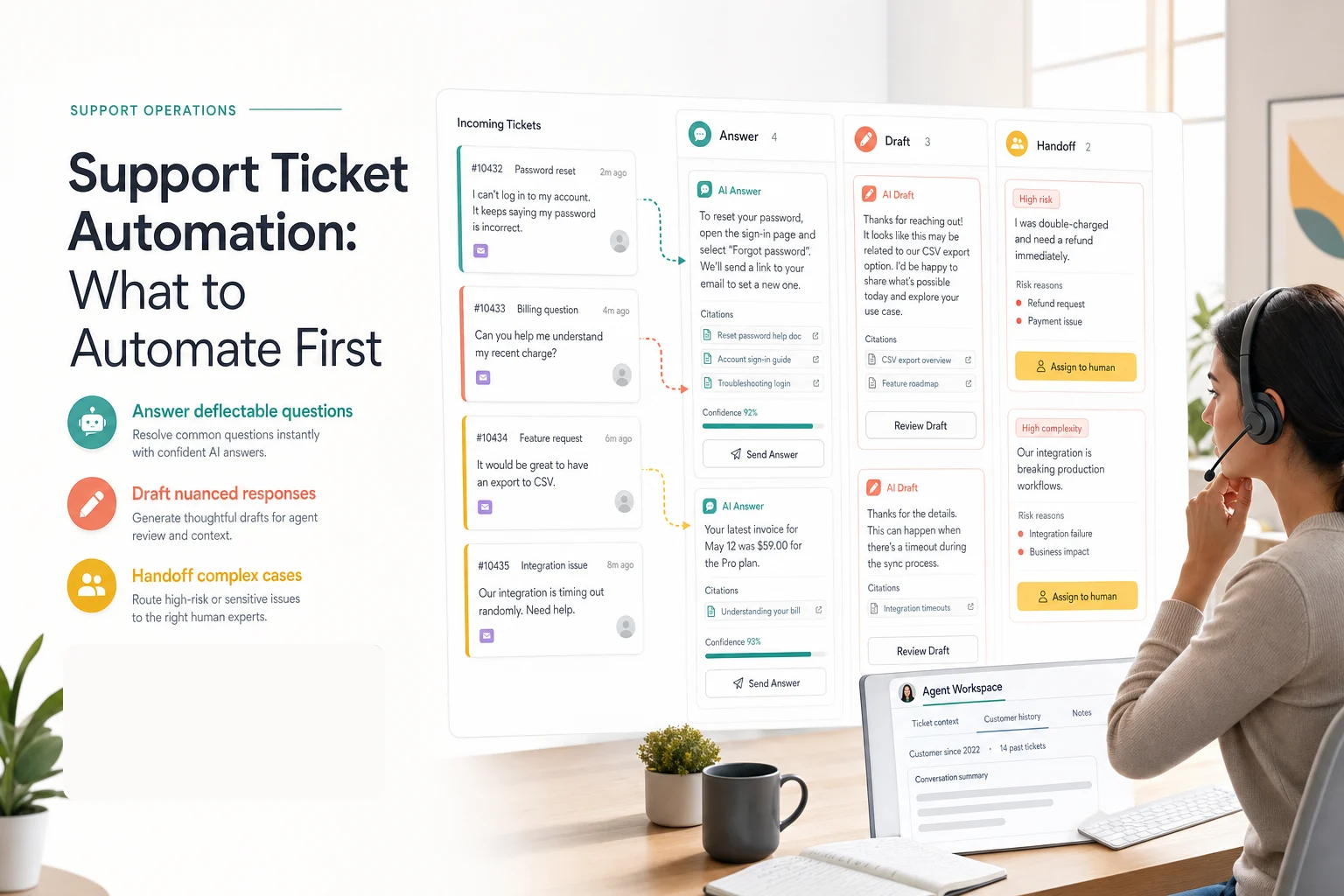
Support ticket automation works when it narrows the work, not when it tries to close every case. The safest first move is to automate high-volume, low-risk tickets from trusted sources, then draft or hand off anything that needs judgment.
This guide is for support teams evaluating AI helpdesk automation, website chatbots, or AI support agents. The first half is tool-agnostic. The second half explains where Owlish fits, because Owlish is our product.
The buyer signal is clear: customers want fast answers, but they still want a person when the issue matters. CX Dive reported in May 2026 that 61% of consumers said they prefer live agents, while more than two-thirds of that group would switch to automated service if it could solve the issue. The same article said 79% of consumers see at least one customer service benefit from AI, such as faster resolution. CX Dive
That is the narrow path for support ticket automation: solve the right issues quickly, and make the exit to a human obvious.
Support ticket automation is more than closing tickets
Support ticket automation means using software, rules, and AI to reduce manual work across the ticket lifecycle.
It can include:
- answering a customer directly from approved sources
- drafting a reply for an agent to review
- classifying intent, urgency, product area, or risk
- summarizing the conversation before a human opens it
- routing the case to the right team
- suggesting source articles or next actions
- creating a knowledge-base gap when no good source exists
- handing off with context instead of making the customer repeat themselves
The important point: automation does not have to mean “AI closes the ticket alone.”
Slack’s May 2026 Workflow Builder update is a useful example. Slack describes a customer support use case where AI triages incoming tickets by summarizing thread history and suggesting a response before an agent opens the case. That is ticket automation, even though the human still owns the final decision. Slack
For many teams, that is the better starting point. Let AI remove prep work before you let it own customer-visible resolution.
Split tickets into answer, draft, and handoff lanes
Do not start by asking, “Can AI handle this?”
Ask which lane the ticket belongs in.
Answer lane
The AI can answer directly when the request is common, low-risk, and backed by a current source.
Good examples:
- “What is included in the Starter plan?”
- “How do I reset my password?”
- “Where do I upload a PDF?”
- “What file types do you support?”
- “How do I install the web widget?”
These tickets work because the answer can be short, cited, and verified. If the source changes, the answer changes.
Draft lane
The AI should draft, not send, when the issue is mostly documented but still needs tone, judgment, or account context.
Good examples:
- a troubleshooting issue with several possible causes
- a billing question that references an invoice
- a complaint where the policy is clear but the tone needs care
- a feature request that should be acknowledged without promising roadmap work
- a technical setup issue where the agent should choose the next diagnostic step
The draft lane is where AI saves agent time without pretending it can make every decision.
Handoff lane
The AI should hand off when the issue is high-risk, emotional, private, or unsupported by a current source.
Good examples:
- refunds and billing exceptions
- account ownership disputes
- legal, compliance, safety, or security concerns
- angry customers
- repeated failed clarification loops
- anything involving private account data the AI cannot safely access
- questions where the knowledge base is missing or contradictory
CX Today’s May 2026 analysis argues that the winning model is selective automation with intelligent routing, and that complex or emotionally charged cases benefit from AI-assisted human agents. That is the operating principle here. CX Today
Start with tickets that have a current source
The best first tickets are not the easiest questions in a demo. They are the questions your business can prove.
Before you automate, pull 50 to 100 recent tickets and group them by intent:
- plan and pricing questions
- password and login problems
- setup questions
- shipping, returns, or cancellation policy
- product troubleshooting
- bugs and outages
- refund or billing exceptions
- feature requests
- complaints
Then attach a source to each intent. If you cannot attach a source, do not put the intent in the answer lane.
Strong sources include:
- help-center articles
- product docs
- pricing and plan pages
- refund, cancellation, shipping, and privacy policies
- internal support SOPs
- troubleshooting guides
- direct Q&A entries for repeated questions
- current release notes
Intercom’s Fin Procedures documentation points in the same direction: it describes a “Look up content” tool that can reference Help Center content, uploaded documents, synced sources, web-synced documents, and snippets during a procedure. It also warns teams to check that content is still synced and active. Intercom Help
Zendesk’s AI agent page makes a similar claim from its product angle: AI agents should launch from connected knowledge and policies, with governance and review over behavior. Zendesk
The vendor does not matter for this rule. If the source is stale, vague, or missing, the automation is not ready.
Write sources so AI can retrieve the right answer
A human can read a messy policy page and infer the answer. Retrieval systems are less forgiving.
Bad source headings:
- “Account lifecycle”
- “Billing notes”
- “More information”
- “Troubleshooting”
Better source headings:
- “How to reset your password”
- “What to do after a duplicate charge”
- “How to cancel before renewal”
- “What file types can be uploaded”
- “How to fix widget domain errors”
Good source content has a few traits:
- one answer per section
- customer language in headings
- exceptions next to the rule they modify
- dates on time-sensitive policy
- examples for common phrasing
- no duplicate old versions
- clear owner for each source folder
Support ticket automation often fails because the AI is asked to compensate for weak documentation. It cannot. The automation will surface the weak documentation faster.
That is useful if you treat it as a feedback loop. Every bad answer should create a source fix, not just a prompt tweak.
Build stop rules before answer rules
Most teams spend too much time writing what the AI should say and not enough time writing when it should stop.
Write stop rules for:
- missing sources
- contradictory sources
- low-confidence retrieval
- customer anger or frustration
- repeated questions after an answer
- account-specific billing decisions
- private data requests
- legal, safety, or security topics
- customer requests for a human
- policy exceptions
Intercom’s help docs say Fin can escalate when a customer clearly asks for a human, when it detects strong frustration or anger, or when the customer is stuck in a repetitive loop. Even if you use another system, those are practical default triggers. Intercom Help
The handoff copy matters too.
Weak handoff:
I cannot help with that.
Better handoff:
I do not have a current source for this answer. I can send this to the support team with the conversation summary so you do not have to repeat yourself.
Best handoff:
I do not have a current source for this billing exception. I am sending this to the billing team with your question, the policy I checked, and the reason I stopped.
The customer should know why the AI stopped. The human should know what happened before they joined.
Measure quality, not just deflection
Deflection is a dangerous headline metric. A bot can deflect a ticket by giving a bad answer, exhausting the customer, or forcing them to open a second ticket later.
CX Today calls containment rate the wrong scoreboard for AI customer service, because it rewards deflection instead of resolution. The better measures are outcome success, recontact rate, customer effort, total time-to-resolution, and handoff quality. CX Today
Track these instead:
- Answer accuracy. Did the customer get the right answer?
- Citation quality. Did the AI cite the right source?
- Recontact rate. Did the customer come back with the same issue?
- Handoff quality. Did the human receive enough context to continue?
- Late handoffs. Did the AI keep going after it should have stopped?
- Source gaps. Which repeated questions have no good source?
- Agent review time. Are drafts saving time, or creating cleanup work?
- Customer effort. Did automation reduce repetition and channel hopping?
Review the first two weeks manually. Read the full conversations, not just the dashboard.
Look for patterns:
- The AI answers policy questions well but fails on exceptions.
- It finds the right article but quotes the wrong section.
- It answers fast but hands off too late.
- It drafts useful troubleshooting replies but sounds too certain.
- It repeatedly finds missing documentation for one product area.
Those patterns tell you what to automate next.
What to automate first
Use this order if you are starting from zero.
1. Public factual questions
Automate questions where the answer is public and stable.
Examples:
- plan limits
- supported file types
- installation steps
- business hours
- return window
- basic setup instructions
Require citations for anything involving money, policy, product behavior, or troubleshooting.
2. Repeated troubleshooting paths
Automate the first diagnostic step when the source is clear.
Examples:
- password reset
- domain allowlist errors
- failed upload basics
- missing email verification
- widget installation checks
Do not let the AI keep guessing. If the first or second diagnostic step fails, move to draft or handoff.
3. Agent drafts for nuanced tickets
Use AI to draft replies when the issue needs a human but does not need a blank page.
Examples:
- billing clarification
- integration setup
- feature requests
- bug reports
- customer complaints with a known policy
The human should see the sources used, the confidence level, and the reason the ticket stayed in draft mode.
4. Handoff summaries for risky tickets
Even when the AI should not answer, it can still help.
For risky tickets, automate the packet:
- customer question
- short summary
- intent
- risk reason
- source checked
- missing source, if any
- recommended owner
- last customer message
Zendesk says its AI agents can route escalations to human teams with context when escalation is needed. Whether you use Zendesk, Intercom, Owlish, or another system, context preservation is the real feature. Zendesk
5. Knowledge-base gap creation
Every unresolved automated ticket should answer one internal question:
Did we have a source for this?
If the answer is no, create a source task. That is how support ticket automation improves over time without hiding failures.
A 14-day rollout plan
Use this if you need a practical launch path.
Days 1-2: Pick the first support lane
Choose one queue, channel, or topic family. Do not launch across the whole helpdesk.
Good first pilots:
- pricing and plan questions
- widget setup
- product FAQ
- simple account navigation
- internal support SOP questions
Bad first pilots:
- refunds
- account ownership
- angry complaints
- security incidents
- complex technical bugs
- high-value enterprise customers
Days 3-4: Classify recent tickets
Pull 50 to 100 recent tickets and put each into answer, draft, or handoff.
Add one more label: “missing source.”
The missing-source list is usually the most valuable output of the exercise.
Days 5-7: Fix sources
Rewrite the sources for the top intents before you launch.
Use clear headings. Remove stale duplicates. Add exceptions. Create direct Q&A entries for short repeated answers.
Days 8-10: Test with real wording
Test messy customer language, not ideal prompts.
Include:
- misspellings
- half-formed questions
- angry wording
- competitor mentions
- old product names
- multi-part questions
- questions with no answer
Score answer accuracy, citation quality, refusal quality, and handoff quality.
Days 11-14: Launch narrowly and review manually
Launch to one page, one queue, one channel, or one internal team.
Read every automated conversation for the first week. Fix sources before expanding scope.
Do not widen the rollout until the current lane works.
Where Owlish fits
Owlish is built for teams that want AI support answers grounded in their own knowledge, with citations and human handoff instead of a black-box chatbot.
For support ticket automation workflows, Owlish currently fits when you need:
- No-code agent setup. Create an agent from your website and customize behavior without building a custom bot. Quick start
- Website and document ingestion. Add websites, PDFs, DOCX, CSV, TXT, Markdown, static HTML, and Direct Response entries. Website docs File docs Direct Response docs
- Cited answers. Inspect which source grounded an answer and fix the source when the answer is wrong. Citation docs
- Web widget deployment. Put the agent on your website and decide whether visitors see citations. Widget docs
- Human handoff. Let a visitor ask for a person, let the agent decide to hand off, or let an operator take over from the inbox. Handoff docs
- Helpdesk visibility. See conversations across channels, including messages, citations, tool calls, and handoff events. Conversations docs
Owlish is a strong fit when your first goal is to answer repetitive support questions from trusted sources and hand over cleanly when the issue should not stay with AI.
It is not the best first choice if you need a voice-first contact center, a full enterprise ticketing migration, workforce management, or complex back-office actions across many systems on day one. In that case, keep the helpdesk suite as the system of record and add AI only where the source, handoff, and ownership model are clear.
FAQ
What is support ticket automation?
Support ticket automation uses software, rules, and AI to reduce manual work in support requests. It can answer common questions, draft replies, classify tickets, summarize context, route cases, and hand off risky issues to the right human team.
Which support tickets should be automated first?
Start with high-volume, low-risk tickets that have current sources. Good first candidates include plan questions, setup steps, password reset instructions, simple troubleshooting, and public policy questions. Avoid billing exceptions, account ownership disputes, security issues, and angry complaints until handoff is proven.
How do you stop AI support automation from giving bad answers?
Require sources for answerable topics, write clear refusal rules, test with real customer wording, inspect citations, and review early conversations manually. When the AI is wrong, fix the source first before changing prompts.
Should AI close support tickets automatically?
Only when the request is low-risk, the answer is sourced, and the customer has a clear path to reopen or ask for a person. For nuanced or risky issues, AI should draft, summarize, classify, or hand off instead of closing the ticket alone.
Can support ticket automation replace a helpdesk?
Usually no. Most teams still need a system of record for queues, SLAs, ownership, reporting, and audit history. AI support automation is best treated as a layer that answers, drafts, routes, summarizes, and improves knowledge around that system.
What metrics matter for AI helpdesk automation?
Track answer accuracy, citation quality, recontact rate, late handoffs, handoff context quality, source gaps, agent review time, and customer effort. Deflection alone is not enough because it can hide unresolved work.
Support ticket automation should make support calmer, not just faster. Start with one queue, cite the sources, hand off early when judgment matters, and use every failure to improve the knowledge base.
If you want to try that workflow in Owlish, start by building your first agent, attach one trusted source folder, test the top tickets your team already receives, then add the web widget or Slack once the answer and handoff rules hold up.