How to Build a Slack Support Bot
A practical Slack support bot setup guide: pick the right use case, train on trusted sources, control channel behavior, and design human handoff.
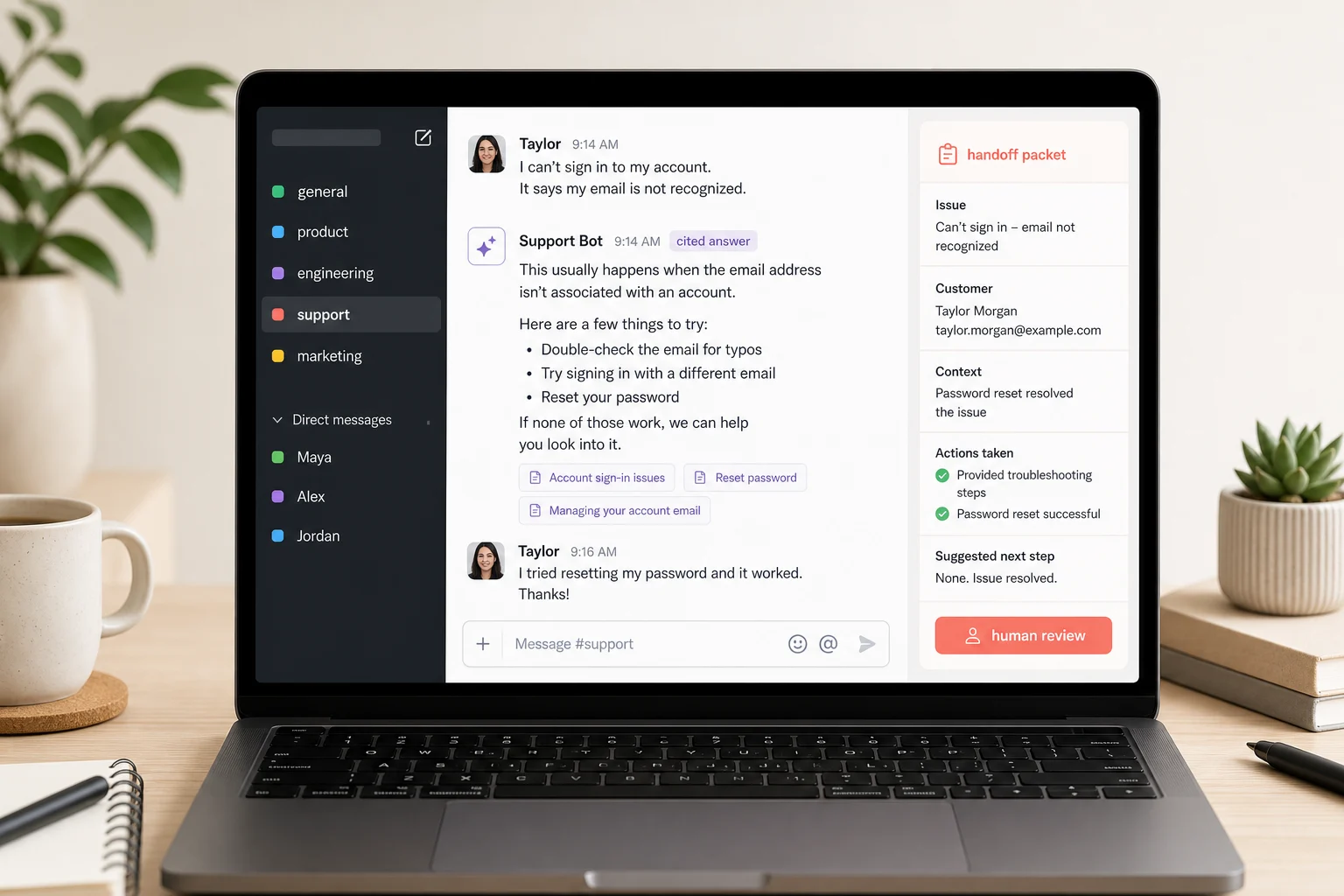
A Slack support bot is useful only if it answers from sources your team trusts and knows when to stay quiet. If it replies in every channel without citations, ownership, or handoff rules, it becomes a faster way to create internal support noise.
This guide shows how to build a Slack support bot for customer support, IT helpdesk, HR, onboarding, or internal operations. The first half is tool-agnostic. The second half explains where Owlish fits, because Owlish is our product.
Slack has been positioning the workspace as a place where AI agents work alongside people, not just a place where humans send messages. Slack’s 2026 agent announcement is a useful trend signal, but the durable buyer question is simpler: which support work should move into Slack, and what guardrails stop the bot from answering badly?
A Slack support bot is not the same as a website chatbot
A website chatbot usually talks to customers at the edge of your business. A Slack support bot usually sits inside the team workflow.
That changes the job.
On a website, the first goal is often answering visitor questions, qualifying demand, and handing off when needed. In Slack, the bot may support employees, operators, sales teams, account managers, engineers, partners, or a private customer community.
Common Slack support bot jobs include:
- answering internal policy and process questions
- helping operators find the right support article during a live customer issue
- routing product bugs from support channels to the right owner
- answering partner or agency questions in shared channels
- handling IT, HR, onboarding, or ops questions from employees
- summarizing a customer issue before a human takes over
The risk is also different. A website bot can frustrate one visitor. A noisy Slack bot can train the whole team to ignore it.
Start with the channel behavior before the model behavior. Decide where the bot should listen, when it should answer, and who owns the answer after it posts.
Pick the first Slack channel before the first workflow
Do not install the bot everywhere on day one.
Pick one channel where the support job is frequent, documented, and low-risk. Good first channels include:
#support-questionsfor internal product and policy questions#it-helpfor standard access and troubleshooting requests#customer-opsfor support process questions#partner-supportfor agency or reseller enablement- a private pilot channel with five to ten operators
Avoid starting in broad channels like #general, noisy sales rooms, executive channels, or incident-response rooms. Those spaces mix casual conversation, sensitive context, and high-stakes decisions.
Before you launch, write the channel contract:
- What questions should the bot answer?
- Which questions should it refuse?
- Does it answer only when mentioned?
- Can it answer follow-ups in a thread?
- Who fixes the source when the answer is wrong?
- Who decides when the bot expands to another channel?
Zendesk’s April 2026 automation potential report is a good proof point for this approach. The report analyzes customer conversations to identify high-impact topics for AI automation instead of guessing which workflows should be automated first. Zendesk Help
Small teams can use the same idea without a reporting suite. Pull the last 100 questions from the candidate Slack channel and group them by intent. If one topic appears every week and has a clear source, it is a good pilot. If the channel is mostly edge cases and judgment calls, do not start there.
Train on sources your team already trusts
A Slack support bot should not learn from random channel history by default.
Slack messages are messy. They include guesses, half-finished decisions, private customer details, jokes, stale policy, and context that made sense only at the time. Treat channel history as discovery material, not as the knowledge base.
Use channel history to find repeated questions. Then answer those questions from cleaner sources:
- help-center articles
- product docs
- internal SOPs
- onboarding guides
- escalation rules
- pricing and packaging notes
- refund, cancellation, or security policies
- short direct answers for repeated internal questions
This is where recent vendor content lines up with the actual operator problem. SiteGPT’s AI customer support guide frames source quality and escalation as part of the support system, not just model selection. Chatbase’s customer service guide likewise treats knowledge sources and automation boundaries as core setup work. SiteGPT Chatbase
For Slack, source quality matters even more because the bot is answering in front of the team. A bad answer can quickly become copied into a customer reply, pasted into a ticket, or treated as policy.
Good source rules:
- Put one answer per section.
- Use the words employees actually ask in Slack.
- Keep exceptions next to the rule they modify.
- Date time-sensitive policies.
- Delete or archive stale process docs.
- Create a clear owner for every source folder.
If nobody owns the source, nobody owns the bot’s answer.
Decide when the bot answers in DMs, mentions, and threads
The safest Slack support bot behavior is usually progressive.
Start with direct messages or explicit mentions. Let the bot answer when someone asks it directly:
@SupportBot what is our refund policy for duplicate charges?
Then allow thread follow-ups after the bot has already joined a conversation. This keeps context together without making the bot jump into every channel message.
Only later should you consider proactive responses, keyword triggers, or broad channel listening. Those can be useful, but they also create false positives. A bot that interrupts normal team conversation will get muted quickly.
A practical behavior ladder:
- DM only. Good for early testing and private employee help.
- Mention only. Good for shared support channels.
- Mention plus thread follow-ups. Good when people ask clarifying questions after the first answer.
- Subscribed channels. Good only when the bot has narrow topic rules and strong source coverage.
- Proactive routing or summaries. Good after you trust the first four modes.
Microsoft’s 2026 Work Trend Index makes the broader operating point: AI impact depends heavily on the system around the tool, including culture, manager support, rules, and how work is measured. Microsoft surveyed 20,000 AI users across 10 countries and found organizational factors accounted for more than twice the reported AI impact of individual factors. Microsoft WorkLab
For a Slack support bot, that “system” is the channel contract. The model matters, but the answering rules matter just as much.
Design citations for operators, not just customers
Citations are not only for customer-facing answers. They are how operators decide whether to trust a Slack answer.
A useful Slack bot answer should make the source visible enough that a person can inspect it before acting:
Duplicate charges are reviewed by billing support. If the customer was charged twice for the same renewal, collect the invoice number and send the case to billing review.
Sources: Refund policy, Billing escalation SOP
That answer is better than:
Yes, we refund duplicate charges.
The second answer may be shorter, but it hides the proof and removes the operator’s chance to catch policy drift.
Use citation rules based on risk:
- Always cite pricing, billing, plan limits, security, legal, policy, and troubleshooting steps.
- Usually cite product behavior, setup instructions, internal process, and support playbooks.
- Do not force citations for greetings, routing, or simple acknowledgement messages.
The goal is not citation decoration. The goal is answer accountability.
Hand off before Slack becomes a support loop
A Slack support bot needs stop rules.
It should not keep answering when:
- it cannot find a relevant source
- the source is stale or contradictory
- the question involves private customer data
- the question needs account-specific judgment
- the issue involves billing exceptions, legal risk, abuse, security, or a complaint
- the human asks for escalation
- the bot has already failed to clarify once or twice
Intercom’s 2026 capacity planning guidance argues that AI support planning should include automation assumptions, human output, and system-level work, not just queue volume. It also warns against cutting too fast before automation performance is proven. Intercom
That translates directly to Slack. Do not measure success by how many Slack replies the bot posts. Measure whether the bot makes the human support system healthier.
A good handoff packet should include:
- the question asked
- the source used, or the missing-source reason
- what the bot already answered
- the customer’s or employee’s last message
- risk flags
- the recommended next human action
Do not make the human read the whole thread before they know what happened. The bot should hand over a short packet, then keep the full transcript available for context.
Measure resolved work, not bot activity
Slack makes activity easy to count. Messages, mentions, threads, reactions, and response times are all visible.
Those are weak success metrics by themselves.
Track outcomes instead:
- repeated questions that disappeared after a source fix
- answers accepted with a source reaction or operator confirmation
- wrong answers corrected before they reached a customer
- handoffs caused by missing knowledge
- late handoffs where the bot should have stopped earlier
- new docs created from repeated Slack questions
- time saved by operators during live customer issues
Review the first two weeks manually. Read bot answers, citations, refusals, and handoff packets. Look for patterns:
- Does the bot cite the wrong source for one topic?
- Are people asking the same question with different wording?
- Is the bot answering policy exceptions too confidently?
- Are operators using the answer, or ignoring it?
- Did a source owner fix the doc after a wrong answer?
The best Slack support bot creates a learning loop. Slack reveals the questions. The bot answers from controlled sources. Operators correct gaps. The knowledge base gets better. The next answer improves.
Where Owlish fits
Owlish is built for teams that want one support agent to answer from real knowledge sources, cite what it used, and hand off when the question should not stay with AI.
For Slack support bot workflows, Owlish currently supports:
- Slack deployment. The same agent that runs on your website can run in Slack. It answers direct messages, mentions, and follow-ups in subscribed threads after it has replied. Slack docs
- Website and file knowledge. Train the agent from websites, help centers, PDFs, DOCX, CSV, TXT, Markdown, direct responses, and other documented support material. Website docs File docs
- Citations. Use citations to inspect which source grounded an answer and debug wrong replies. Citation docs
- Human handoff. Let a visitor ask for a person, let the agent decide to hand off, or let an operator take over from the helpdesk inbox. Human handoff docs
- Helpdesk visibility. Slack conversations are preserved in the Owlish helpdesk inbox so the team can see the wider session history. Conversations docs
Owlish is a strong fit when your team wants a no-code support bot that answers from websites and documents, keeps sources visible, and can expand from a website widget into Slack.
It is not the best first choice if you need a deep enterprise service-management suite, complex approval workflows across many back-office systems, or a custom Slack app built around proprietary internal actions. In those cases, start with the system of record or a custom app, then add AI answers once ownership and permissions are settled.
Slack support bot launch checklist
Use this before the first public Slack launch:
- Pick one channel or DM pilot.
- Pull recent Slack questions and group them by intent.
- Choose one frequent, documented support job.
- Attach a trusted source to every answer the bot should give.
- Mark risky topics as handoff or do-not-answer.
- Start with DM or mention-only behavior.
- Allow thread follow-ups only after the first answer works.
- Require citations for policy, billing, security, and troubleshooting.
- Write handoff copy and a handoff packet format.
- Review answers manually for the first two weeks.
- Fix the source when the bot is wrong.
- Expand channel by channel, not workspace-wide.
FAQ
What is a Slack support bot?
A Slack support bot is an automated assistant that answers support questions inside Slack. It can help employees, operators, partners, or customers in Slack channels, direct messages, and threads. A good Slack support bot answers from approved sources and hands off when the question needs a person.
How do I build a Slack support bot for customer support?
Start by choosing one Slack channel and one support job. Group recent questions by intent, prepare trusted source content, configure the bot to answer only in DMs or mentions, test citations, and define handoff rules before expanding to more channels.
Should a Slack support bot answer every channel message?
Usually no. Mention-only or DM-only behavior is safer at launch. Broad channel listening can be useful later, but only when the bot has narrow scope, strong source coverage, and clear rules for staying quiet.
What sources should a Slack AI agent use?
Use help-center articles, product docs, internal SOPs, onboarding guides, policy pages, escalation rules, and short direct answers for repeated questions. Avoid training directly on unreviewed Slack history unless you have a clear cleanup and approval process.
When should a Slack support bot hand off to a human?
It should hand off when no reliable source exists, the issue involves private data or judgment, the customer or employee asks for a person, the bot is stuck in a loop, or the answer could affect money, access, security, or trust.
A Slack support bot works best when it has a narrow job, visible sources, and a clear stop point. Start with one channel, prove the answer path, then expand only after the team trusts the workflow.
If you want to try that in Owlish, start by building your first agent, attach one trusted source folder, test the questions your team already asks, then connect Slack once the answers and handoff rules hold up.