Build an AI Knowledge Base for Customer Support
An AI knowledge base for customer support needs more than uploaded docs. Here is how to structure sources, refresh cadence, citations, and handoff.
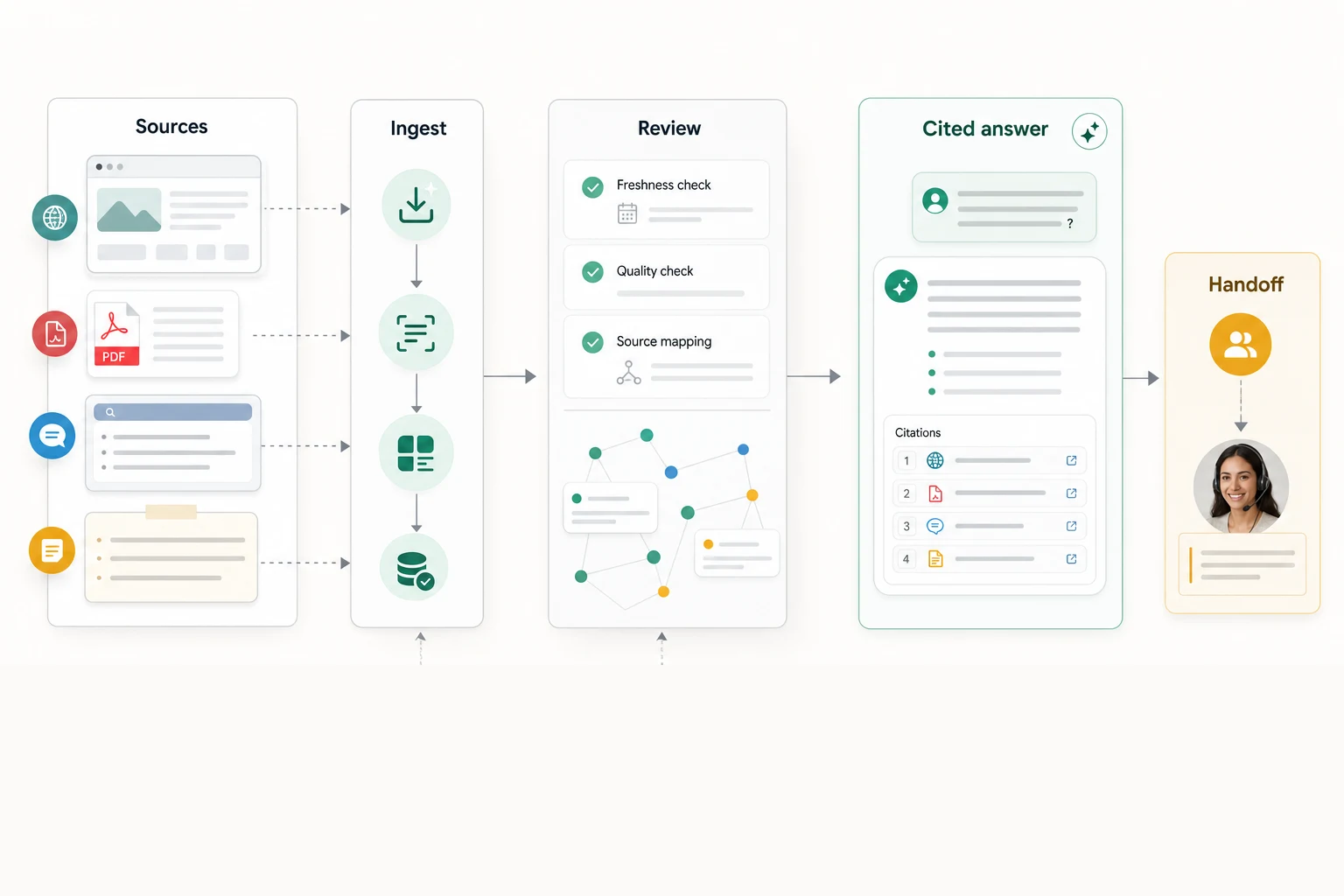
An AI support agent is only as good as the content it can retrieve. If your knowledge base is stale, vague, or scattered across help docs, PDFs, tickets, and internal notes, the chatbot will produce fast answers your team cannot trust.
This guide is about building an AI knowledge base for customer support that can survive real customer questions. Not a folder of uploaded PDFs. A working source system with ownership, refresh rules, citations, and a clear handoff path when the answer is missing.
Owlish is our product, so I will show where it fits. The first job, though, is the operating model. The same structure helps whether you use Owlish, a helpdesk AI feature, or a custom RAG stack.
An AI knowledge base is not just a help center
A normal help center is written for humans. It has navigation, categories, nice summaries, and sometimes a search box.
An AI knowledge base needs to support retrieval. The agent has to turn a customer question into a search query, find the right source chunks, pass them into the model, and produce an answer that can be verified.
That changes what “good content” means.
Good AI support knowledge is:
- Specific enough to retrieve. The answer uses the same terms customers use.
- Narrow enough to cite. A policy is not buried inside a 14-page PDF with six unrelated sections.
- Current enough to trust. Pricing, shipping, refunds, service areas, and eligibility rules have a refresh owner.
- Scoped enough to protect. Customer-facing agents do not read internal-only handbooks unless you want them to.
- Complete enough to refuse. If the source does not cover the question, the agent should stop instead of stretching.
That last point matters. The Australian Government’s National AI Centre reported in its December 2025 to February 2026 adoption insights that about 65% of non-adopting SMEs cited distrust in AI decision-making or a preference for human control, and 19% said they did not know how to use AI in their business. That is not a model problem alone. It is a trust and operating-model problem. AI.gov.au
Start with questions, not sources
The mistake is to ask, “What documents can we upload?”
Ask this instead: “What questions do customers actually ask, and which answers are safe for the AI to give?”
Before you ingest anything, turn those decisions into a customer support knowledge base template. The source map records the canonical source, owner, update trigger, citation probe, and handoff boundary for each high-value intent—so your first source set is controlled rather than merely comprehensive.
Build the first version from real support demand:
- Export the last 100-300 support conversations, tickets, chat logs, or emails.
- Group questions by intent, not wording. “Can I cancel?”, “How do I stop renewal?”, and “How do I turn this off?” may all map to the same cancellation policy.
- Mark each group as safe, sensitive, or human-only.
- Find the source that proves each safe answer.
- Write or fix the source before you train the agent.
Do not skip step four. If a senior operator knows the answer but it is not written anywhere, the agent does not know it. Tribal knowledge becomes AI risk unless you turn it into source material.
Intercom’s May 2026 knowledge-management guide makes the same operational point from a sales-agent angle: teams need ongoing ownership, review cadence, and a simple way for frontline staff to log content gaps. That advice applies even more sharply to support, where stale policy copy can become a refund dispute. Intercom
Split sources by answer risk
Not every source belongs in the same bucket. The support agent should not treat a public FAQ, an internal macro, a legal policy, and a pricing spreadsheet as equally safe.
Use a simple source map:
| Source type | Use it for | Refresh owner |
|---|---|---|
| Public help pages | Common setup, troubleshooting, shipping, returns, plan rules | Support ops or product marketing |
| Uploaded files | Manuals, policy PDFs, product sheets, onboarding docs | The team that owns the document |
| Direct answers | Short canonical answers for repeat questions and edge cases | Support lead |
| Internal notes | Operator-only context, escalation rules, exceptions | Support lead or ops manager |
The important part is not the exact labels. It is that every source has a job, a risk level, and a human owner.
For example, a public help-center article can answer “How do I reset my password?” directly. A billing exception policy may need a softer answer plus handoff. A VIP discount rule may be useful for operators but unsafe for a public widget.
If your tool supports folders, use them deliberately. A customer-facing agent might read “Public help center” and “Shipping policy.” An internal Slack support bot might also read “Operator handbook.” That separation prevents a customer bot from citing something that was only meant for staff.
Write chunks that retrieval can actually find
AI support failures often come from weak source writing, not weak models.
A human can infer that a paragraph about “service interruption credit” answers a customer’s “refund after outage” question. Retrieval systems are more literal. They need enough overlap between the customer wording and the source wording to find the right chunk.
Make support content easier to retrieve:
- Put one answer per section.
- Use customer language in headings.
- Spell out acronyms the first time.
- Include policy boundaries, not just the happy path.
- Keep exceptions near the rule they modify.
- Add examples for questions that customers phrase many ways.
Bad source heading:
Account lifecycle
Better source heading:
How to cancel your account before the next renewal
Bad policy text:
Refunds are reviewed according to eligibility.
Better policy text:
We review refund requests case by case. If you were charged after cancelling before renewal, contact support with the invoice date and cancellation confirmation.
That second version gives the agent something it can cite without inventing the missing details.
Decide what the AI should never answer alone
A useful AI knowledge base includes refusal rules. This is where many teams get uncomfortable because refusal feels like a product failure. It is not.
Refusal is what keeps the agent from pretending.
Mark these topics before launch:
- legal advice
- medical or safety advice
- billing exceptions
- account ownership disputes
- angry complaints
- policy edge cases not covered by the source
- anything involving sensitive personal information
Then write the fallback. A good fallback does three things:
- Says the agent does not have enough information.
- Avoids implying a policy decision.
- Offers a human path with the transcript attached.
Zendesk’s AI transparency guide frames explainability as the ability to give understandable reasons for AI decisions and actions. In customer support, citations and handoff are the practical version of that idea. The customer should know what source the answer came from, and the operator should know why the AI stopped. Zendesk
Build a refresh loop before launch
The day you launch an AI support agent, your knowledge base starts decaying.
Pricing changes. Product screens change. Shipping carriers change. Support discovers a weird edge case. Someone edits a help page without realizing the bot depends on it.
Set a maintenance loop before you publish:
- Daily or weekly gap review. Look at unanswered questions and low-confidence answers.
- Monthly policy review. Check pricing, refunds, shipping, service areas, privacy, security, and account terms.
- Launch checklist. Every new feature or plan change gets customer-facing help copy before release.
- Owner field. Every source has a person or team responsible for accuracy.
- Change path. Operators can request a new answer without opening an engineering ticket.
Microsoft’s 2026 Work Trend Index makes the same broader point: AI impact depends heavily on whether the organization around the tools is ready to support them. For support teams, the organization around the AI is the content owner, QA reviewer, escalation owner, and weekly source-maintenance routine. Microsoft WorkLab
Without that loop, the bot might look good on launch day and get worse every week after.
Add citations before you add more channels
It is tempting to deploy everywhere first: website, Slack, Teams, email, WhatsApp, social DMs.
Do the opposite. Prove the answers on one channel first.
For an AI support knowledge base, citations are the QA surface:
- The customer sees where the answer came from.
- The operator can debug the exact source.
- The support lead can spot stale or thin content.
- The business can distinguish “bad answer” from “bad source.”
When an answer is wrong, the first question should not be “What did the model do?” It should be “What did it cite?”
If it cited the wrong source, fix folder scope or source wording. If it cited the right source but answered badly, tighten the answer guidance. If it had no citation, add the missing source or force a handoff path.
That is much easier to do before the same agent is replying across every channel.
Where Owlish fits
Owlish is built around this exact workflow: source ingestion first, grounded answers second, handoff when the answer should stop.
The current product supports three practical source types:
- Websites for public help centers, docs, and marketing pages. Owlish crawls the main content, strips boilerplate, supports allow and exclude patterns, and can re-sync on a schedule. Website source docs
- Files for PDFs, DOCX, CSV, TXT, Markdown, and static HTML. Scanned PDFs can use OCR fallback, and sources become citable when ingestion finishes. File source docs
- Direct Response entries for short canonical answers that do not deserve a full help-center article yet. Direct Response docs
Owlish also renders citation chips for public-channel answers when enabled, so a customer or operator can inspect the source behind the reply. Citations docs
That makes Owlish a good fit when your team wants:
- no-code setup from website and document sources
- source-cited answers in the web widget
- a practical path from support gaps to new source material
- human handoff for questions the AI should not answer alone
- one knowledge base that can support web and team-chat workflows
Owlish is not the best fit if you mainly need a large enterprise contact-center suite, complex telephony routing, or a bespoke in-house RAG platform with custom infrastructure controls. In those cases, a broader helpdesk suite or a custom build may be the better first stop.
A practical launch checklist
Use this before putting an AI support agent in front of customers:
- Pick the first channel, usually the website widget.
- Export recent support conversations and group the top questions.
- Mark each question safe, sensitive, or human-only.
- Attach a source to every safe answer.
- Write Direct Response entries for repeat questions that are not documented yet.
- Split public and internal knowledge into separate folders or scopes.
- Enable citations and test the top 30 questions manually.
- Write fallback copy for missing answers and sensitive topics.
- Turn on handoff for questions that need judgment.
- Schedule a weekly gap review for the first month.
If that feels like too much ceremony, reduce the scope. Launch with fewer answers, not weaker controls.
FAQ
What is an AI knowledge base for customer support?
An AI knowledge base for customer support is a set of structured sources that an AI agent can retrieve from when answering customer questions. It usually includes help-center pages, product docs, FAQs, policy files, manuals, and short canonical answers. The important difference from a normal help center is that each answer should be retrievable, current, scoped, and citable.
How do I train an AI chatbot on my knowledge base?
Start by collecting the questions customers actually ask, then map each safe answer to a written source. Upload or crawl those sources into your AI support tool, test the top questions, inspect citations, and add missing answers before launch. You are usually not fine-tuning a model. You are giving the agent better retrieval sources.
Should an AI support bot cite sources?
Yes, if the bot is answering policy, pricing, product, shipping, account, or troubleshooting questions. Citations let customers and operators verify the answer. They also make QA possible because your team can fix the source that caused the answer instead of guessing what the model did.
What should not go in a customer-facing AI knowledge base?
Do not expose internal-only exception rules, private customer data, unreleased product plans, staff notes, security-sensitive procedures, or anything the customer should not see quoted back to them. Put internal material in a separate scope for operator use, or keep it out of the AI system entirely.
How often should an AI support knowledge base be updated?
High-risk content such as pricing, refunds, shipping, compliance, and account policies should be reviewed at least monthly and whenever a launch changes the customer experience. Fast-moving help-center content may need weekly or scheduled re-sync. The safer rule is simple: if a human support operator would need the update, the AI source needs it too.
Give the agent fewer chances to guess
The best AI support knowledge base is not the biggest one. It is the one with the clearest answers, the cleanest scope, the freshest sources, and the most obvious stop signs.
If you want to try that workflow in Owlish, start with one help-center URL, add a few Direct Response entries for your highest-volume questions, enable citations, and test the top questions before you widen the rollout.