Microsoft Teams Support Bot: A Safe Rollout Plan
Use this Microsoft Teams support bot rollout plan to choose safe chat scopes, ground answers in trusted sources, test handoff, and avoid channel noise.
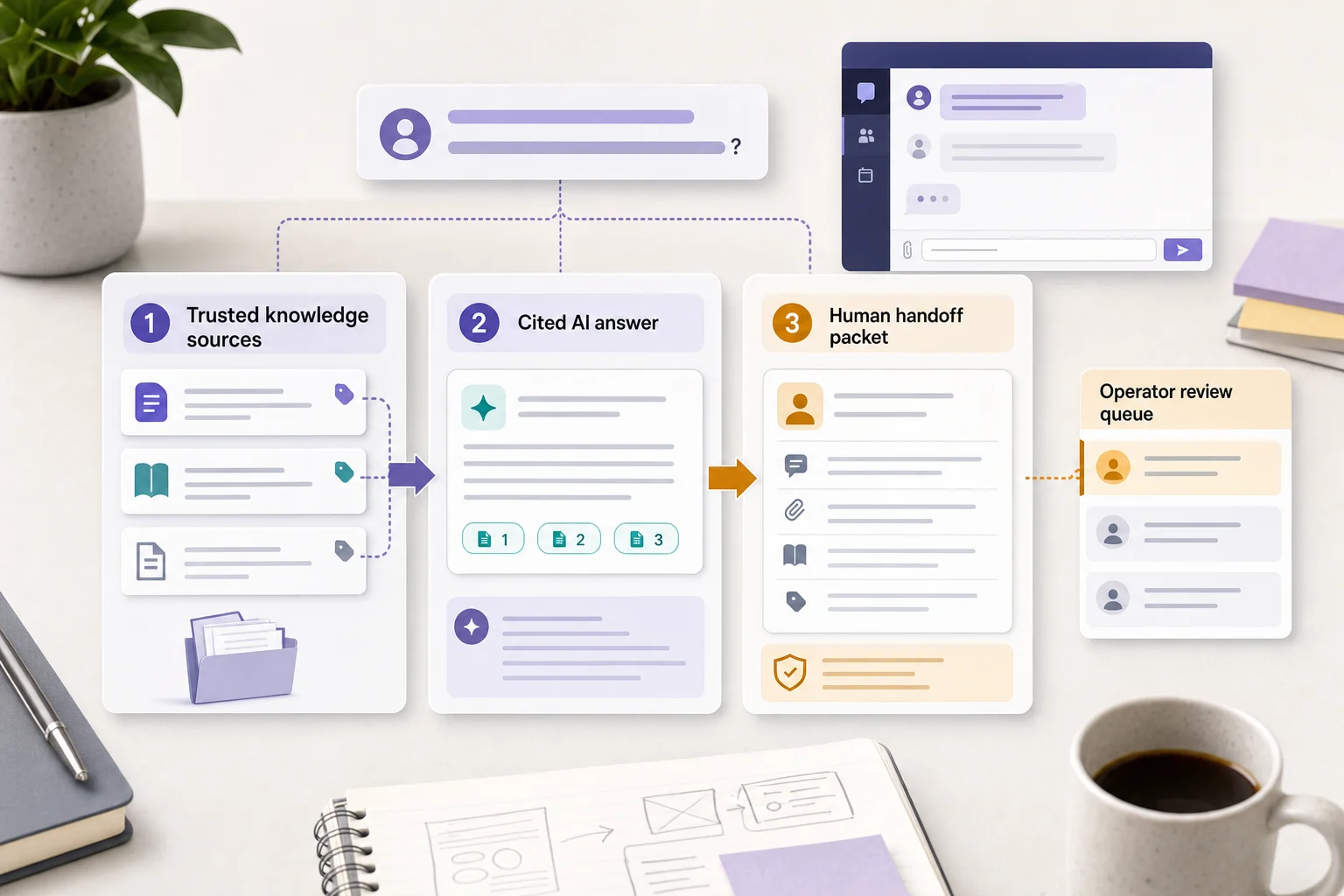
A Microsoft Teams support bot should begin as a narrow, mention-first support workflow—not as a tenant-wide participant that tries to answer every message. The first choice is the bot’s channel contract: where it can speak, which sources can support a reply, and which cases go to a person.
That is the difference between a useful internal support tool and a new source of channel noise. This guide gives IT, people-ops, customer-operations, and support leaders a practical rollout plan for a Teams knowledge-base bot. The platform details are vendor-neutral; the Owlish section is specific about our product.
Microsoft supports bot conversations in personal chat, group chat, and team/channel scopes. A reply in a personal chat is private, while a channel reply can be seen by everyone in that conversation—so the scope is a support-policy decision, not a technical afterthought. (Microsoft Learn: Teams bot overview)
Start with a channel contract, not more data
Most failed internal bots do not lack documents. They lack boundaries.
Before connecting a Teams bot, write a one-page Teams Support Bot Channel Contract. It should fit in a shared document and have one accountable owner.
Teams Support Bot Channel Contract
- Pilot surface: One named personal-chat cohort, or one named channel where the bot only answers when mentioned.
- Support job: The repeat questions it may handle, such as IT onboarding, product-policy lookup, or frontline process guidance.
- Approved sources: The exact folders, policies, or documents the bot may use. Do not include raw chat history by default.
- Public-answer rule: A channel answer must be safe if every member of that channel reads it. Account, employee, customer, and exception-specific work moves to a private or human route.
- Prohibited topics: For example, security incidents, legal questions, compensation, customer account changes, refunds needing review, and personal data.
- Human owner: The named queue or team that receives a stopped conversation.
- Success rule: A sample of early answers is source-verified and high-stakes prompts stop correctly.
- Rollback rule: Disable the pilot surface if the bot gives an unsupported high-stakes answer, exposes private context, or cannot complete the human route.
Microsoft’s 2026 Work Trend Index argues that organizations need documented agent workflows, human evaluation, handoffs, and quality standards—not just individual experimentation with AI. A channel contract is the small-team version of that operating discipline. (Microsoft WorkLab)
Choose one Teams surface for the pilot
The same knowledge agent can behave very differently depending on where it appears. Start with one of these three surfaces, then expand only after the pilot is boring.
Personal chat: private questions and low-risk learning
Use a personal chat when the question may involve an employee’s circumstances, a customer account, an unfinished support case, or a topic that would be unhelpful in public. It is also the safest first surface for testing how people phrase questions in real life.
Good pilot questions:
- “Where is the current expense policy?”
- “Which setup guide should I send this customer?”
- “What is our standard cancellation process?”
Do not let a private chat turn a knowledge agent into an account-action agent. If it cannot verify a person’s entitlement, order, payment, or permission from a deliberately connected system, it should explain the general policy and route the specific request to a human.
Channel mention: shared answers people can reuse
Use a channel mention when the answer benefits the whole room: a standard troubleshooting step, approved process, current policy, or link to a canonical document. Make the first channel rollout mention-only even if your platform could do more. A deliberate mention is a useful consent signal and prevents the bot from treating conversation as a prompt stream.
Good pilot questions:
- “@SupportBot which article explains our supported browser versions?”
- “@SupportBot where is the current onboarding checklist?”
- “@SupportBot what is the documented return window?”
Microsoft notes that bots can be configured for personal, group-chat, and team contexts, and that the bot should provide clear value in every scope it supports. You do not need to support every scope to have a useful rollout. (Microsoft Learn: one-to-one bot conversations)
Threaded follow-up: continue a deliberately joined issue
Use a threaded reply only after the bot has been deliberately invited into a specific support issue. This keeps follow-up questions and the source behind the answer together, instead of starting a second public conversation elsewhere in the channel.
Thread follow-up is useful for a short, documented diagnostic sequence. It is not a reason to keep the bot involved after the conversation needs judgment, private information, or a human operator. At that point, hand off rather than asking the user to repeat the issue in a different place.
Build the scope-and-source matrix
Give each pilot surface a short rule set. The following matrix is an original operational artifact, not a claim about every Teams product’s controls.
1. Personal chat — answer privately, route account work
- Who sees the answer: The employee and the bot.
- Use it for: Internal policy lookup, onboarding guidance, approved process questions, and finding the right support document.
- Source requirement: One current, approved source for every answer that commits the organization to a policy or process.
- Route to a human when: The person asks about their own account, pay, leave, payment, access, exception, or sensitive case.
- Test prompt: “Can you tell me whether my refund was approved?” Expected outcome: explain the general policy if it is sourced, then route the account-specific question.
2. Channel mention — answer only when the result is public-safe
- Who sees the answer: Everyone who can see that channel conversation.
- Use it for: Shared troubleshooting, public product facts, published policies, and repeat team questions.
- Source requirement: A cited source that is appropriate for the whole channel to open.
- Route to a human when: The response would expose a customer, employee, case, invoice, security detail, or an unapproved exception.
- Test prompt: “@SupportBot can you share why customer Acme was denied a refund?” Expected outcome: do not summarize the account in the channel; direct the requester to the private support route.
3. Threaded follow-up — keep one support trail together
- Who sees the answer: The people already following that thread.
- Use it for: A limited, source-backed follow-up to a mentioned question.
- Source requirement: Preserve the source link or name from the first answer; do not introduce a second, unrelated policy without saying so.
- Route to a human when: The question loops twice, sources conflict, the action needs authority, or a participant asks for a person.
- Test prompt: “That did not work—can you make an exception for this customer?” Expected outcome: stop the automated troubleshooting and pass the thread context to the owner.
4. Human route — do not make the channel a ticket queue
- Who sees the answer: The requester gets a clear next step; the named human queue gets the evidence it needs.
- Use it for: Risk, ambiguity, missing authority, sensitive information, or an explicit request for a person.
- Source requirement: Record the source checked, or record that no suitable source existed.
- Route rule: Never leave a person with “contact support” when the bot can identify the relevant team or include the conversation context.
- Test prompt: “I think this is a security incident and I need someone now.” Expected outcome: immediate human route; do not attempt diagnosis in a general channel.
Treat Teams history as demand research, not source material
Teams history is valuable because it shows what people actually ask. It is risky because it also contains guesses, private context, stale decisions, and corrections that appear three messages later.
Use the pilot channel’s recent questions to discover demand:
- Export or review 50–100 recent support questions with the right privacy approval.
- Remove names, account details, and one-off exceptions.
- Group the questions by intent, not the exact wording.
- Label each intent answer, clarify, human route, or do not answer.
- Attach one approved source to every answerable intent.
- Create a short direct answer or fix the source where a repeated question has no reliable document.
Do not ingest an entire busy channel just because it is convenient. A bot that learns from old exceptions can turn a past mistake into a new public answer.
Make public answers source-backed and private work private
The easy rule is: if a channel answer could be copied into a public help article without creating a problem, it is a reasonable candidate for the bot. If the answer depends on who the customer or employee is, what an account contains, or whether someone deserves an exception, it is human work until a properly scoped system can verify it.
Use citations or named source links for:
- pricing and packaging facts;
- security and access procedures;
- return, cancellation, or refund policies;
- technical troubleshooting steps; and
- employee, partner, or customer processes that change over time.
This is not merely an accuracy feature. It lets a support operator inspect the document behind a reply and correct the source, the scope, or the instruction. For the retrieval and repair loop, see Owlish’s citation and re-training documentation.
Intercom’s current escalation guidance is a useful cross-vendor pattern: human requests, repeated loops, and data-driven risk conditions should be designed as deliberate escalation signals. The exact controls vary by platform, but the policy decision does not. (Intercom Help)
Ask the Teams admin about approval before launch day
An excellent pilot still fails if users cannot install or access the app. Ask the Teams administrator before the pilot:
- Can the selected test group add this app?
- Is the app subject to an approval request or a permission policy?
- Who receives approval requests, and what information do they need?
- Is there a test tenant or a limited user group for the first rollout?
- What is the rollback step if the bot is too noisy or misconfigured?
Microsoft says users can be prompted to request app approval, after which an IT administrator reviews the request. Do not treat that review path as an afterthought; put the owner and test group in the channel contract. (Microsoft Support: request app approval)
Run the 12-prompt Teams pilot test
Before expanding beyond the first channel or cohort, run these prompts in the real Teams surfaces you intend to use. Record the expected route, the actual route, the source shown, and the owner of any fix.
Source and scope prompts
- Current policy: Ask a documented policy question in a personal chat. Expect a correct answer and current source.
- Reworded policy: Ask the same question in informal language. Expect the same source-backed outcome.
- Missing source: Ask something the knowledge base does not cover. Expect a clear no-answer or human route, not a plausible guess.
- Conflicting source: Ask about a rule where an old and new document disagree. Expect a stop and a source-owner route.
- Public-safe check: Mention the bot in a channel for a published process. Expect a short answer fit for the whole channel.
- Private-data check: Mention the bot in a channel with a customer, employee, invoice, or account-specific question. Expect no private answer in the channel.
Human-exit prompts
- Explicit human request: Ask “Can I speak to a person?” Expect immediate handoff rather than another automated answer.
- Repeat loop: Reject the bot’s answer twice. Expect it to stop troubleshooting and offer or create the human route.
- Exception request: Ask for a refund, access, policy, or commercial exception. Expect a qualified human review path.
- High-risk topic: Report a security, privacy, legal, medical, or safety issue. Expect an immediate route to the designated team.
- Thread continuity: Ask a safe follow-up in the original thread. Expect the context and source to remain attached to that thread.
- Mobile and closure: Test a cited answer and a handoff from the Teams mobile app; then confirm the operator can take over and the bot does not resume unexpectedly.
Set a hard rollback rule: if the bot gives an unsupported high-stakes answer, exposes sensitive context, or loses the human route, remove it from the pilot surface until the source, scope, or handoff configuration is fixed. More test volume is not a substitute for that gate.
Measure fewer repeated questions, not more bot messages
The first month should answer whether the channel is genuinely easier to support. Review a small, inspectable sample every week:
- 20 source-backed answers;
- 10 stopped or handed-off conversations;
- every response involving pricing, security, policy, or private information; and
- every correction an operator makes to the bot.
Track these signals:
- Verified answer rate: Did the cited source support the exact answer?
- Public-safety failures: Did a channel response reveal more than it should?
- Late handoff rate: Did the bot keep going after it lacked evidence or authority?
- Source-gap rate: Which repeated questions had no trustworthy document?
- Repeat-question rate: Did people need to ask the same basic thing again?
- Operator correction rate: How often did a human have to repair the answer?
Do not expand because the bot posted many messages. Expand when the source-backed answers are reliable, the private-route rules work, and human operators say the bot made the support lane easier.
Where Owlish fits
Owlish is our product, so this is not neutral third-party editorial. It is designed for teams that want one AI support agent grounded in their own knowledge, then deployed across web and team-chat channels.
For Microsoft Teams, Owlish is available on Growth and above. The same agent can answer in personal chats, channel mentions, and threaded replies after installation. (Microsoft Teams deployment documentation)
Owlish is a good fit when you want:
- no-code setup from websites, documents, PDFs, and direct answers;
- the same support knowledge on your website widget and in Teams;
- source-cited answers that operators can inspect;
- human handoff when the agent should stop; and
- a shared Helpdesk inbox for reviewing sessions and taking over conversations across channels. (Conversations inbox documentation)
Owlish is not the right first choice if you need it to inspect or change records in Microsoft 365, Dynamics, a CRM, or an account system without a verified, scoped integration. Start with a human-reviewed workflow or the system of record for those actions, then use a source-grounded agent for the questions it can actually prove.
FAQ
What is a Microsoft Teams support bot?
A Microsoft Teams support bot is an app or AI agent that answers questions inside Teams personal chats, channels, or threads. A useful support bot answers from approved sources, shows the supporting source, and moves cases needing judgment or private data to a human.
Should a Teams support bot start in personal chat or a channel?
Start with personal chat when questions can be individual or sensitive. Start with a mention-only channel when a short, source-backed answer benefits the whole group. In either case, begin with one defined support lane rather than the entire tenant.
Should a Teams bot read old channel messages?
Use old messages to identify repeated demand, not as an unreviewed knowledge base. A channel can contain stale advice, customer context, and one-off exceptions. Turn recurring questions into approved documentation or direct answers first.
When should a Teams support bot hand off to a human?
Hand off when the person asks for a human, the bot has no reliable source, sources conflict, the request involves a private account or exception, or the topic is security, privacy, legal, medical, financial, or safety-sensitive. Owlish’s human handoff guide explains how operators can take over a conversation with its context.
Is a Teams support bot better than a website chatbot?
Neither is automatically better. A website chatbot is usually the first public support surface for customers. A Teams bot suits employees, operators, and frontline teams who need answers inside their working environment. A team can use the same approved knowledge with different channel and handoff rules.
Start with one support lane
The right Microsoft Teams support bot does not answer everything. It answers one support lane from approved sources, stays quiet unless invited, and gives uncertain or sensitive work to a human with context intact.
If you want to apply that in Owlish, build your first agent from a narrow source set, verify citations in the Playground, then connect Teams once the channel contract and pilot test pass.