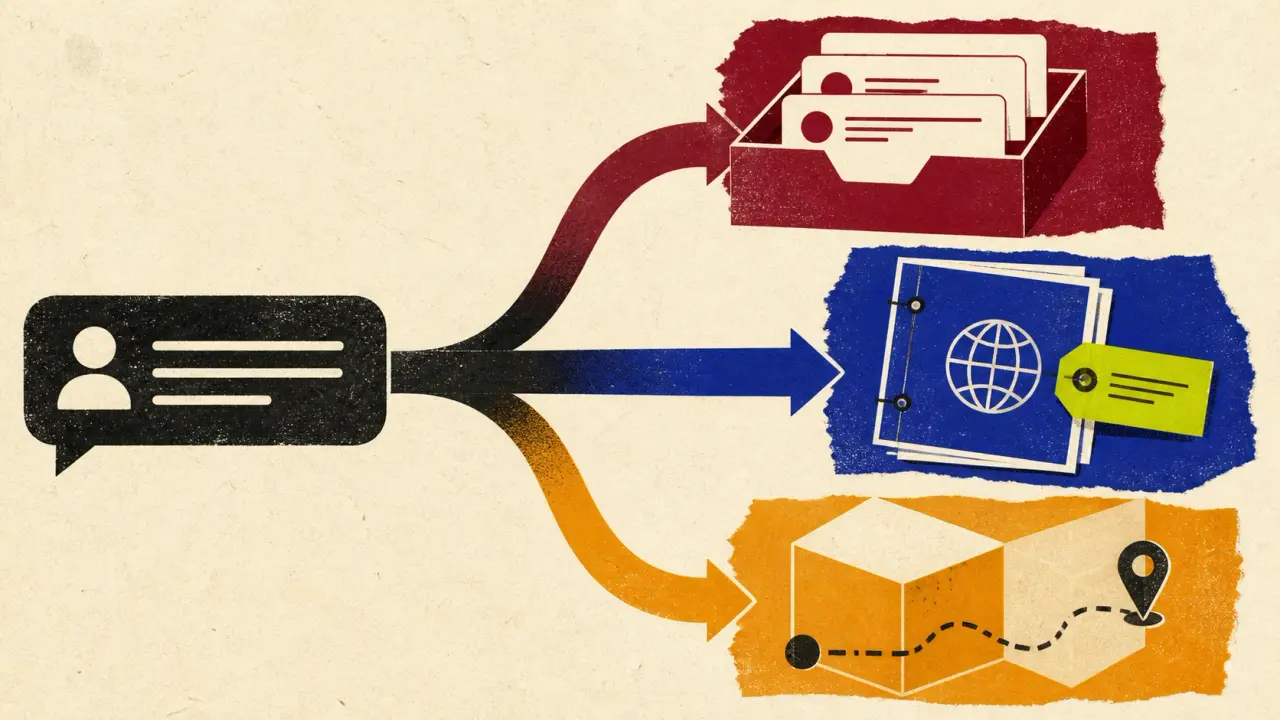

If Front is where your team assigns conversations, leaves internal comments, and keeps account context, replacing it merely to add an AI answer is usually the wrong move. The useful Front alternative is the one that preserves the workflow you need while changing the part that is actually failing.
That makes “Front alternatives” three different buying jobs: keep the shared inbox and improve public answers; move to a fuller customer-service suite; or choose a simpler inbox with a different cost shape. This guide uses a keep, layer, or migrate decision so a chatbot demo does not accidentally turn into an unnecessary support-platform migration.
Owlish is our product, so this is not neutral third-party editorial. I checked public product, pricing, and help pages for the tools below in August 2026. Plans and packaging change, so use the linked primary sources to confirm the details that affect your contract.
The short answer: compare the job, not the logo
| Tool | Best for | Key strengths | Limitations | Pricing note checked August 2026 |
|---|---|---|---|---|
| Owlish | Cited public answers from owned sources | Citations, web/docs, handoff | No native Front route | Free; Starter $39/$49; handoff Growth+ |
| Help Scout | Human-first help desk with Docs | Inbox, Docs, Beacon | AI-resolution meter | Plan + $0.75/resolution |
| Intercom Fin | AI agent plus service platform | Fin, inbox, workflows | Seat + outcome cost | $29/seat + from $0.99/outcome |
| Zendesk | Larger service operation | Ticketing, suite, AI agents | Heavier migration | $19 / $55 / $115 per seat |
| Missive | Collaborative inbox work | Shared inbox, rules, team spaces | No cited public-answer layer | $14 / $24 / $36 per seat |
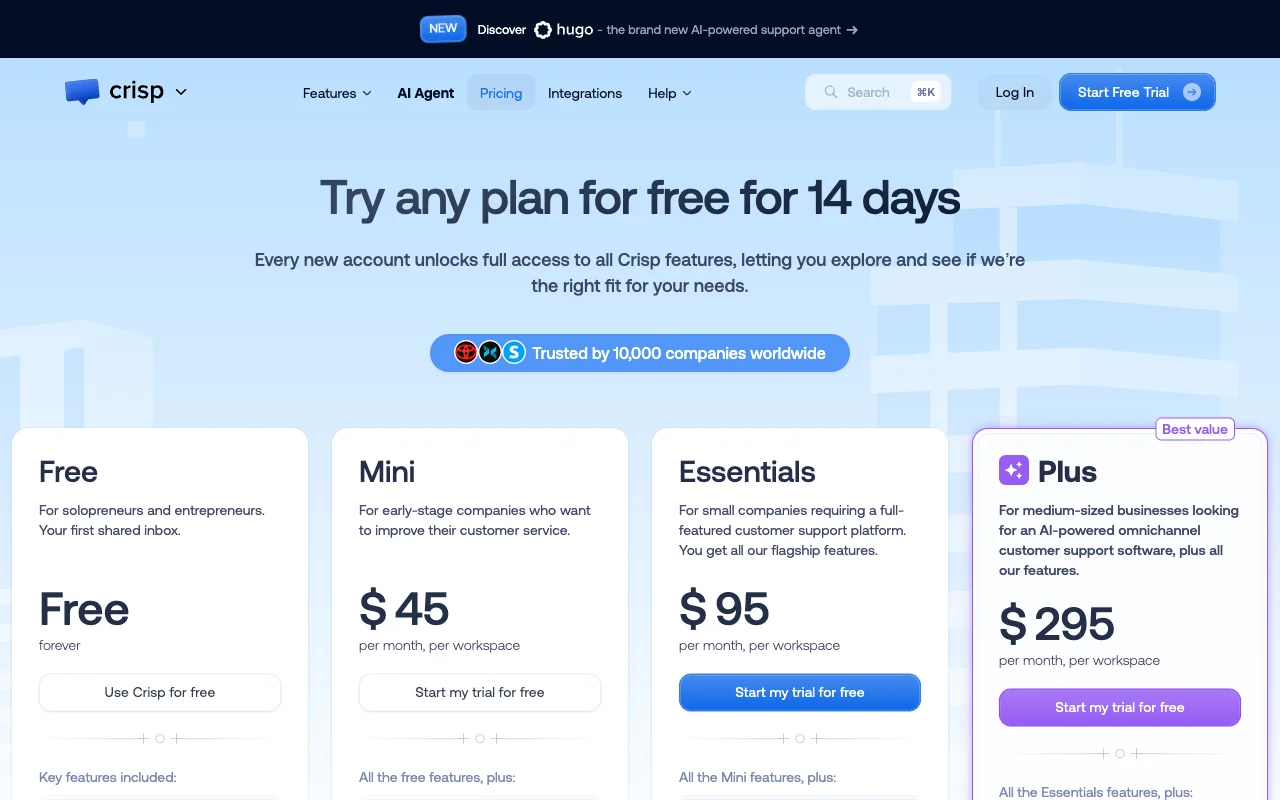
| Crisp | Integrated inbox and support suite | Inbox, KB, AI | Test tier and AI volume | Free; $45 / $95 / $295 workspace |
The table is not a ranking. A shared inbox, a full service suite, and a cited AI answering layer are different layers of a support system. Choose the layer you need to change before comparing price cards.
Start with the Front workflow you would keep
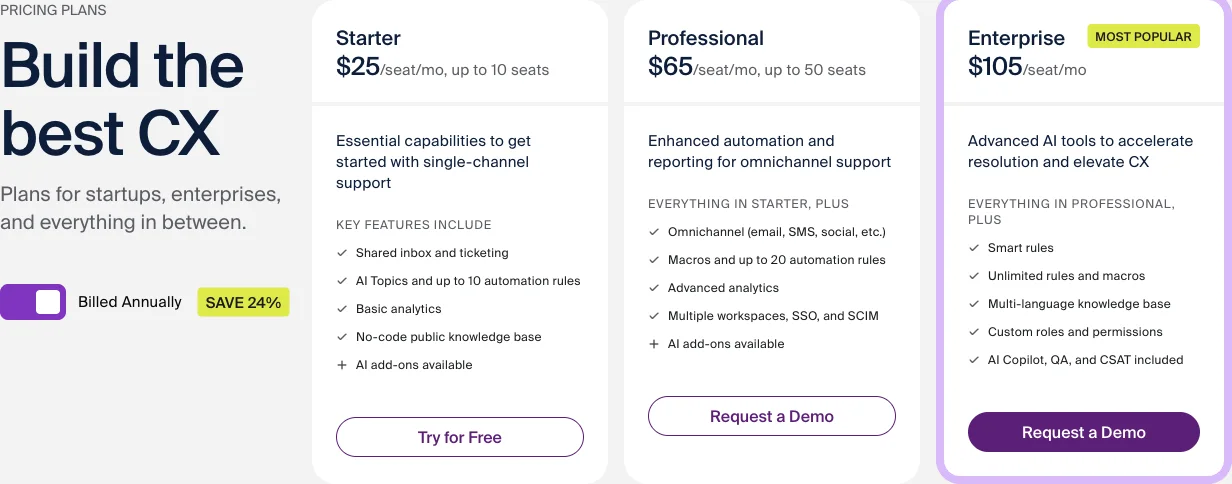
Front’s public pricing page lists shared inbox and ticketing on Starter, with assignments, tags, internal comments, shared drafts, and rules in its feature comparison. The same page lists Starter at $25 per seat per month billed annually, Professional at $65, and Enterprise at $105. See Front’s current plans and feature comparison.
Those are not incidental capabilities. They represent the day-to-day operating system for a team that works from a shared queue. Before you switch, write down which of these is genuinely doing work for you:
- Which channels and queues do agents open every day?
- Which assignments, tags, comments, or shared drafts must remain visible to the next operator?
- Which customer context comes from Front rather than a public help centre?
- Which questions are safe to answer from maintained public sources, and which require account data or human judgment?
- What should a human receive when a visitor asks to escalate?
An AI tool can make the public-answer part better without replacing the inbox. Conversely, no amount of polished website chat fixes a team that needs deeper ticket routing, governance, or service reporting.
Use the Front Workflow Retention Map before a trial
This is the original decision artifact in this guide. Fill it in with a support lead and an operator who works in the queue. It turns a vague request for a Front alternative into a small, testable change plan.
| Current Front workflow | What the customer needs | Keep, layer, or migrate? | Proof before a tool change |
|---|---|---|---|
| Assignment, internal note, or long-running thread | A human owner with context | Keep an inbox workflow | An operator can pick up without the customer repeating the issue |
| Public setup, policy, or troubleshooting question | A supported answer from owned content | Layer an answering agent | Ten real questions show the relevant source or a clear no-answer boundary |
| Account, order, invoice, or entitlement question | Verified live data or an authorised action | Keep or migrate based on documented integrations | The exact connector, permissions, and fallback are demonstrated, not assumed |
| High-volume email or chat queue that outgrew current reporting and routing | A deeper service operation | Migrate only if used daily | A real queue, SLA, report, and escalation route work in the new system |
| Basic shared email collaboration | A lower-cost team inbox | Migrate to another inbox if the workflow is simpler | Assignment, shared drafts, and external collaboration work on your actual channels |
The most common mistake is treating every public question as a ticketing problem. A cited answer layer is useful when the source is public and maintained. It is not a substitute for account data, a refund action, an exception, or the operational history inside your shared inbox.
Run the Keep–Layer–Migrate proof sheet
Use the same short test sheet for every finalist. Do not start with a vendor’s demo prompt.
- Ten answerable questions. Pull ten recent public questions from your help centre, policies, and setup docs. Record the exact source each answer should use.
- Three believable unknowns. Ask about an unpublished price, an exception policy, and a feature you do not offer. A pass is a clear boundary or human route, not a confident answer.
- Three handoff questions. Include a person asking for help, a complaint, and a billing or security exception. Inspect the operator view: prior context, reason for escalation, and who owns the next reply.
- Two account-specific requests. Try order status, an invoice, or an entitlement. If the candidate cannot demonstrate the exact integration and permission model, the correct answer is to keep the request in a verified human or connected-system workflow.
- One high-volume scenario. Apply your busiest recent month to the vendor’s billing unit: seat, outcome, resolution, session, conversation, or workspace. Include the base plan, usage, connectors, and migration work.
For every question, mark answer boundary, source evidence, human exit, and billable event. A product can pass the first three and still have a cost model that does not fit your operation. It can also be inexpensive while failing the source or handoff test.
1. Owlish: a cited AI layer, not a Front replacement
Owlish fits when the gap is customer-facing self-service from sources you own. You can build a no-code agent from website pages, documents, and PDFs, then give visitors citations that point to the retrieved source material. The citation guide explains how those answer references work, including how to trace a wrong answer back to the source that produced it.
The boundary is important: Owlish does not currently document a native Front integration, and it is not a ticketing or CRM replacement. Its human handoff pauses the agent and routes the session to Owlish’s Helpdesk inbox, where an operator can take over with the conversation context. Do not promise that an Owlish handoff arrives in Front unless you have independently verified a route for your setup.
Choose Owlish when the right change is a cited web-and-document answering layer. Keep Front, or choose another full suite, when assignments, inbox collaboration, account context, and queue management are the main asset. The current price is Free; Starter $49/month monthly or $39/month billed annually; Growth $149/month monthly or $119/month billed annually; and Scale $449/month monthly or $359/month billed annually. The plans guide confirms that handoff is available on Growth and Scale.
2. Help Scout: for a human-first help desk with Docs and AI Answers
Help Scout is a relevant Front alternative when the team wants a shared inbox and knowledge-base workflow, but prefers its Inbox, Docs, and Beacon model. Its AI Answers documentation says the website widget can use a site’s website and Docs content, while human help remains available. The product has a three-month trial for AI Answers, then a published $0.75 per resolution. Read Help Scout’s current AI Answers documentation.
That makes Help Scout worth trialling when a human-first operating model is still the centre of support. It is not a reason to migrate if Front’s collaboration and customer-context workflow is already the part your team values. Model the per-resolution meter against real source-grounded questions and the human work that remains.
3. Intercom Fin: for an AI agent and broader support platform
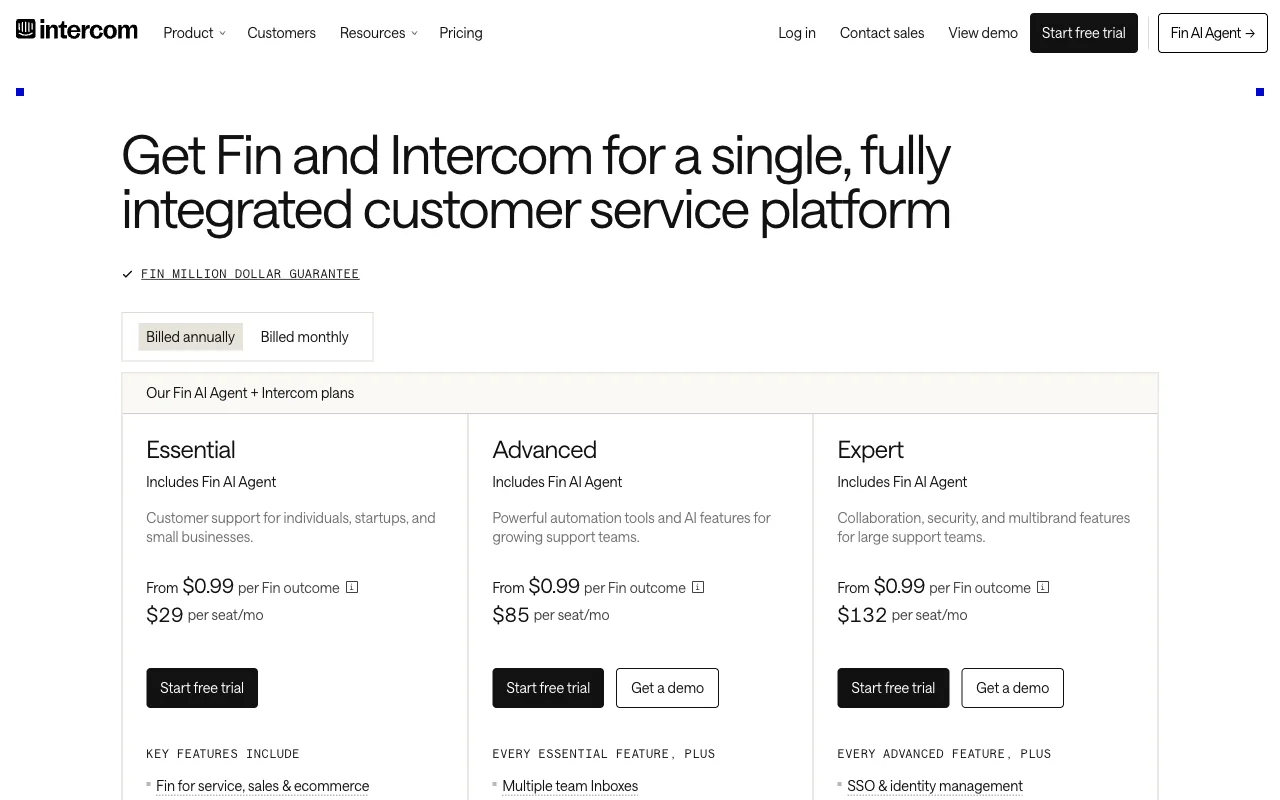
Intercom is the option to evaluate when you want an AI agent as part of a broader customer-service platform. Its pricing page shows the Fin AI Agent with Essential, Advanced, and Expert plans; the published annual Essential price begins at $29 per seat per month, and the page states from $0.99 per Fin outcome. Review Intercom’s current pricing.
The useful comparison is not “does Fin answer questions?” It is whether the platform, seats, outcome definition, and migration work are justified by the support job. Intercom’s pricing FAQs also distinguish a Fin plus Intercom plan from Fin on another help desk, so ask for the exact route and commercial model you would use. See Intercom’s pricing FAQs.
4. Zendesk: for a deeper service operation
Zendesk makes sense when the migration itself is the point: you need a more structured ticketing, routing, reporting, knowledge-base, and AI-agent operation. Zendesk’s public plans page lists Support Team at US$19 per agent per month paid yearly, Suite Team at US$55, and Suite Professional at US$115. Check Zendesk’s current pricing.
Zendesk documents AI agents across messaging, email, API, form, and voice early access, beginning with trusted knowledge sources and extending to procedures and authorised actions where configured. Read Zendesk’s current AI agent overview. That is a more expansive operating model than a public answering layer. Choose it when the team will use the suite’s service workflow every day, not merely because a chatbot comparison lists it.
5. Missive: for a collaborative inbox with a simpler seat model
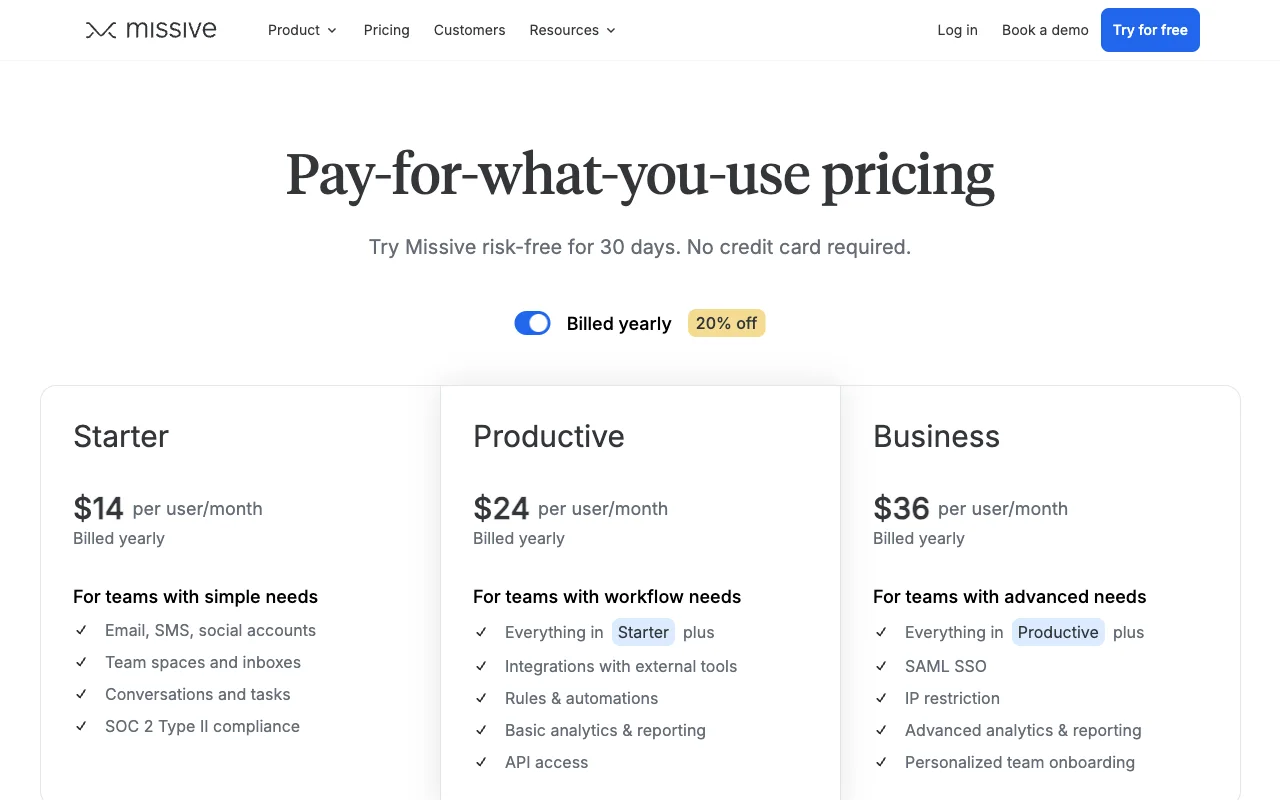
Missive is an inbox-first option for teams whose work mainly remains in shared email, SMS, social accounts, team spaces, and shared inboxes. Its public pricing page lists Starter at $14, Productive at $24, and Business at $36 per user per month billed annually. See Missive’s current plans.
The tradeoff is clear: Missive is a useful inbox comparison, but it is not positioned as a standalone cited, public-knowledge answer layer. It is worth a focused trial when the Front workflow you need to retain is collaborative message work, and the price or product shape is what you want to change.
6. Crisp: for a workspace-priced support suite
Crisp is a Front alternative to evaluate when a shared inbox, help centre, and AI support features should live in one workspace-priced product. Its current pricing page lists Free, Mini at $45 per workspace per month, Essentials at $95, and Plus at $295. The Essentials plan includes an omnichannel inbox, AI chatbot, knowledge base, and routing features. See Crisp’s public plans.
Crisp is a better candidate for a team that wants an integrated support suite than for a buyer who only needs a cited public answer layer in front of an otherwise working inbox. Test the knowledge-source controls, operator handoff, channel mix, and included AI capacity against your actual traffic. For a deeper decision framework, see our Crisp alternatives guide.
Which Front alternative fits your team?
- Keep Front when the shared inbox, assignment, comments, and account context are the work you need to preserve. Add or improve AI only after the real-question test proves the safe scope.
- Choose Owlish when your main gap is a no-code, source-grounded public answer layer with citations and a human exit. It is not a documented Front integration or full inbox replacement.
- Choose Help Scout when a human-first inbox, Docs, and Beacon fit the operating model, and the AI-resolution meter works for your traffic.
- Choose Intercom Fin when you are deliberately adopting its broader platform and accept its seat and outcome model.
- Choose Zendesk when you need a larger ticketing and service-operation suite, not a lightweight add-on.
- Choose Missive when collaborative inbox work is the core job and you want a simpler per-user inbox model.
- Choose Crisp when a workspace-priced, integrated inbox and support suite fits your channels and source workflow.
There is no absolute winner. The better result is a narrower change that keeps the parts of the support operation that already work.
Frequently asked questions
What is the best Front alternative?
It depends on the job Front performs for your team. Keep Front if the shared inbox and account context are valuable. Consider Owlish for cited public answers from your owned sources, Help Scout or Missive for a different inbox model, Intercom or Zendesk for a broader support platform, and Crisp for a workspace-priced support suite. Run the proof sheet against real questions before choosing.
Can I add AI support without replacing Front?
Yes, when the job is public, source-grounded answers rather than inbox replacement. But do not assume two products share handoffs, customer context, or account data. Owlish does not currently document a native Front integration, so verify the exact visitor and operator journey before you promise one workflow.
What should I test before moving away from Front?
Test ten questions your sources should answer, three believable unknown questions, three handoff or high-stakes questions, and two account-specific requests. Record correctness, source evidence, the human exit, and the billing event. Also prove assignments, notes, and the operator’s context in the new workflow.
Is Front’s AI included in every plan?
Front’s public plan comparison lists AI add-ons on Starter and Professional, and its AI Copilot add-on at $20 per seat per month, while Enterprise includes the listed Copilot, QA, and CSAT tools. Confirm the current product and commercial terms with Front before buying. Front’s pricing page is the primary source for the current plan comparison.
Sources and trademark notice
Competitor product and pricing details in this comparison were checked in August 2026 against Front, Help Scout, Intercom, Zendesk, Missive, and Crisp, plus the linked official help documentation. Owlish product claims were checked against the current citation, human handoff, and plan documentation.
Front, Help Scout, Intercom, Fin, Zendesk, Missive, Crisp, and other product names mentioned here are trademarks or registered trademarks of their respective owners. Owlish is not affiliated with or endorsed by those companies unless explicitly stated.
If the gap is public answers from your own website and documents, build an Owlish agent with a small source set. Use the proof sheet against the questions your team already handles, then decide whether to keep, layer, or migrate.