How to Train an AI Chatbot on Your Own Data (Without Fine-Tuning a Model)
A practical 2026 guide to training an AI chatbot on your own data for customer support: what training actually means, the step-by-step ingestion workflow, how to avoid hallucinations with grounding and citations, and when fine-tuning is the wrong tool.
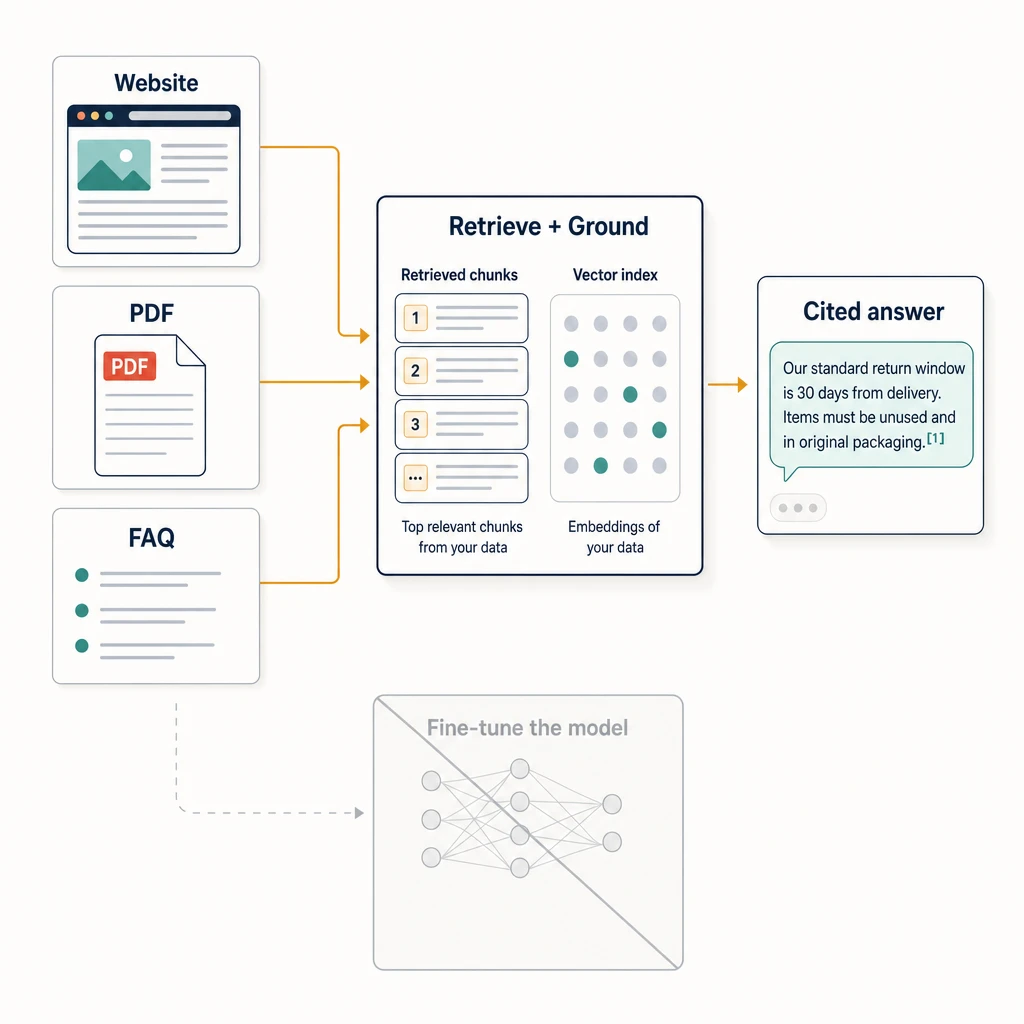
When people say they want to “train an AI chatbot on their own data,” they almost never mean training a model — and for customer support, trying to literally train one is usually the wrong move. What you actually want is a model that reads from your content at answer time, so it responds with your refund policy instead of a plausible guess.
That distinction is the whole game. Get it right and you ship a support agent that cites a real help article. Get it wrong and you spend weeks fine-tuning a model that still invents shipping timelines. This guide walks through what “training on your data” means in 2026, the step-by-step workflow to do it well, and the mistakes that quietly produce a confident, wrong bot.
”Training” usually means grounding, not fine-tuning
There are two ways to make an AI chatbot answer from your data, and they are not interchangeable.
Retrieval (RAG). You upload your content — help articles, PDFs, product pages, policy docs. The platform splits it into chunks, turns each chunk into a vector embedding, and stores it in an index. When a customer asks a question, the system retrieves the most relevant chunks and hands them to the model along with the question. The model answers from that retrieved text, not from memory. Because the content is fetched at query time, updating an answer is as simple as updating the source. This is the approach most support chatbot platforms use, and it is what “train on your data” almost always refers to in practice. (Robylon: train an AI chatbot on your data)
Fine-tuning. You adjust the model’s weights using many labeled examples so it absorbs a style, tone, or output format. Fine-tuning changes the model itself. It is good at teaching how to respond, and poor at teaching what is currently true, because facts get baked in at training time and go stale the moment your prices change.
For a support agent whose job is to give correct, current answers, retrieval does the heavy lifting and fine-tuning is optional polish. We covered the full tradeoff in RAG vs. fine-tuning for customer support; the short version is below.
| Retrieval (RAG) | Fine-tuning | |
|---|---|---|
| Teaches | What is true (your facts) | How to respond (style, format) |
| Update a wrong answer | Edit the source, re-sync | Re-train the model |
| Hallucination risk | Lower — answers are grounded in fetched text | Higher — facts are memorized and drift |
| Setup effort | Low, no ML expertise | High, needs labeled data |
If your goal is accurate customer answers, the rest of this guide is about doing retrieval well. Fine-tuning gets its own honest section near the end.
Step 1: Decide what counts as a source
Before you upload anything, write down which content is allowed to become an answer. This is the single highest-leverage decision in the whole process, and most people skip it.
Use a customer support knowledge base template to make that decision repeatable: map each customer intent to one canonical source, owner, update trigger, citation probe, and handoff boundary before it enters the agent’s source set.
If that source lives in Notion, do not treat a workspace connection as the boundary. Our guide to using a public Notion knowledge base safely shows how to review published parents and subpages, choose a controlled file export when a page cannot be public, and test the citation and refusal paths before you expose the agent.
The model will repeat whatever you feed it. Feed it a 2023 pricing PDF and it will quote 2023 prices with total confidence. So the first pass is curation, not collection:
- In: current help center articles, the latest policy and returns pages, up-to-date product specs, vetted FAQ answers, onboarding docs.
- Out: outdated drafts, internal-only Slack threads, contradictory duplicates, marketing pages that overstate what the product does, anything you would not want quoted verbatim to a customer.
A small, clean, current corpus beats a large, messy one every time. The retrieval system has no judgment about which of two conflicting documents is right — it will surface whichever scores higher, and you will not know which one a customer saw.
Step 2: Clean and structure the content first
Retrieval quality is mostly a content problem, not a model problem. The model can only be as clear as the chunk it retrieves, so spend your effort here.
- One answer per section. Give each distinct question its own heading and self-contained answer. Chunking tends to split on structure, so a page where the answer to “How do I get a refund?” is scattered across three sections will retrieve poorly.
- Put the answer near the question. Avoid burying the actual policy three paragraphs below a preamble. The closer the answer sits to language a customer would use, the better it retrieves.
- Kill contradictions. If two pages disagree on the return window, fix it at the source now. You cannot patch this at the model layer.
- Use plain customer language. Documents written in internal jargon retrieve badly against questions phrased the way real customers ask them.
This step is unglamorous and it is where most of the accuracy gains live.
Step 3: Ingest the content
Now you actually load the data. A no-code support platform typically gives you a few ingestion paths, and good coverage usually means combining them:
- Crawl your website. Point the tool at your domain or help center and let it pull pages. This is the fastest way to cover a lot of ground, and the easiest to let go stale, so note which pages you crawled.
- Upload documents and PDFs. Policy docs, product manuals, and spec sheets that never made it onto a public page. PDFs are common and worth handling carefully, since layout-heavy files can chunk awkwardly.
- Add direct answers / FAQs. For your highest-volume questions, write the exact answer you want the agent to give rather than hoping retrieval assembles it from prose. This is the most reliable way to control the response to your top ten tickets.
In Owlish, these map to crawling a website, dropping in PDFs, and pasting Direct Response answers; each source is chunked, embedded, and made available to the agent. The mechanics are similar across modern platforms — the point is to cover your real question mix, not to max out the upload count.
Step 4: Understand what happens under the hood
You do not need to implement this, but you should know what the platform is doing, because it explains every failure you will later debug.
- Chunking. Each document is split into passages, often a few hundred tokens each. Bad chunk boundaries — an answer split down the middle — are a top cause of “it has the info but won’t answer.”
- Embedding. Each chunk becomes a vector, a numeric representation of its meaning. Owlish uses Google’s
gemini-embedding-2for this; the specific model matters less than knowing the step exists. - Indexing. Vectors are stored so the system can find the closest matches to a question quickly.
- Retrieval + generation. At question time, the system embeds the question, pulls the nearest chunks, and passes them to the model as context. The model writes the answer from that context.
When a bot answers wrong, the fix is almost always at one of these layers — usually the content or the chunking — not “the model is bad.”
Step 5: Turn on citations
A grounded answer you cannot verify is just a confident answer. Citations are the difference between “trust me” and “here’s the source,” and they are the most practical hallucination defense available to a small team.
Grounding the model in retrieved text already lowers hallucination risk, because the model is told to answer from supplied content rather than its general training. Citing the specific source closes the loop: a customer can check it, and your team can spot when the agent is pulling from the wrong document. Industry guidance on AI knowledge bases consistently lists grounding plus source citation as the core of hallucination control. (Brainfish: AI knowledge base guide)
Practically: turn citations on, then read them during testing. If the agent answers a refund question by citing a blog post instead of the refund policy, that is a content or retrieval problem you can now see and fix. Without citations, that failure is invisible until a customer complains.
Step 6: Test against the questions you actually get
Do not test with the questions you wish customers asked. Pull twenty to fifty real ones from your inbox, chat logs, or ticket history, and run them through the agent before anyone outside the team sees it.
Score each answer on three things:
- Correct? Does it match the source of truth, not just sound reasonable?
- Grounded? Is it citing a real, relevant document — or improvising?
- Complete? Does it actually resolve the question, or dodge with “visit our help center”?
The questions that fail cluster into patterns: a missing document, a contradictory pair, a chunk that split badly, a question your data simply cannot answer. The first three are fixes. The fourth is the next step.
Step 7: Plan for what the data can’t answer
No knowledge base covers everything. Account-specific questions (“where is my order”), edge cases, and judgment calls will always exist, and a bot that guesses at those is worse than one that hands off.
Decide the handoff rules before launch:
- Low confidence or no relevant source → hand off rather than guess.
- Explicit human request → hand off immediately, no friction.
- Sensitive topics (billing disputes, cancellations, anything legal) → route to a person by policy, even if the bot technically has an answer.
The honest version of “train on your data” includes admitting where the data ends. A clean handoff to a human, with the transcript attached, beats a confident wrong answer every time. We go deeper in the AI support handoff guide.
Step 8: Keep the data fresh
Retrieval’s biggest advantage is also its biggest maintenance task: the agent is only as current as your sources. The day you change a policy, your bot is wrong until the index reflects it.
Build a small routine:
- Re-sync on a schedule. Re-crawl and re-index so edits propagate. Some plans automate this; on manual plans, put it on a calendar.
- Re-sync on change. When a policy, price, or product detail changes, treat updating the source as part of shipping the change, not an afterthought.
- Watch the citations over time. If the agent starts citing a deprecated page, that is your signal a source needs pruning.
A knowledge base is a living asset. The teams whose bots stay accurate are the ones who treat content updates as routine support work, not a one-time setup.
When fine-tuning actually helps
Retrieval handles facts; fine-tuning handles behavior. It earns its cost in a few specific cases:
- A very consistent tone or format you cannot get from instructions alone — a tightly regulated disclosure style, a fixed response structure.
- Domain language the base model handles awkwardly, where examples teach phrasing better than retrieval.
- High, stable volume where the up-front training cost amortizes and the underlying knowledge rarely changes.
Even then, fine-tuning is usually layered on top of retrieval, not instead of it — the model learns how to sound, retrieval keeps it factually current. (yourGPT: training an AI chatbot on your data) For most support teams shipping their first agent, fine-tuning is a premature optimization. Start with clean content, good retrieval, and citations; reach for fine-tuning only when a concrete behavior problem survives all three.
Where Owlish fits
Owlish is our product, so this is not neutral editorial — but the workflow above holds whichever tool you pick. Owlish is built for the retrieval path specifically, for small and growing support teams that want grounded answers without standing up an ML pipeline:
- Ingestion that matches the steps above — crawl a website, upload PDFs, and write Direct Response answers for your top questions. Sources are chunked, embedded, and cited.
- Citations on by default, so you can see which source an answer came from while you test, not after a customer complains.
- Human handoff to a shared Helpdesk inbox, with the full transcript and citations, for everything the data should not answer.
- No-code setup, so the work is content curation, not engineering.
Owlish has a free tier to build and test an agent on the web widget, and paid plans start at $39/mo billed annually ($49/mo monthly) on Starter and $119/mo billed annually ($149/mo monthly) on Growth, which adds human handoff, the shared inbox, and scheduled knowledge-base sync.
When is Owlish not the right call? If you need a full enterprise service desk with deep ticketing, telephony, and CRM workflows, a larger suite fits better — platforms like Intercom or Zendesk are built for that footprint. Intercom prices its Fin agent on resolved outcomes at $0.99 each and reports up to 65% end-to-end resolution in customer cases, which can be the right model at scale and an unpredictable bill for a small team. (Fin by Intercom) Owlish is the better fit when you want grounded, cited answers and clean handoff without the suite.
Frequently asked questions
Do I need to know machine learning to train a chatbot on my data? No. For the retrieval approach, you upload content and the platform handles chunking, embedding, and indexing. Your work is curating accurate sources and testing answers — content work, not ML work.
Is “training” the same as fine-tuning? Usually not. In most support tools, “train on your data” means retrieval (RAG): the model reads your content at answer time. Fine-tuning, which changes the model’s weights, is a separate, heavier process most teams do not need for factual support answers.
How do I stop the chatbot from making things up? Three layers: ground it in your content so it answers from retrieved text, turn on citations so every answer is traceable, and set handoff rules so it escalates instead of guessing when it has no relevant source.
How much data do I need to start? Less than you think. A clean set covering your top twenty to thirty questions — current help articles, key policies, and direct answers for high-volume tickets — outperforms a large, contradictory dump. Add coverage as real questions reveal gaps.
How often should I update the knowledge base? Whenever the underlying facts change, and on a recurring schedule as a backstop. Because retrieval reads sources live, the agent goes out of date the moment a policy or price changes and the source still says the old thing.
Can I train one agent on a website, PDFs, and FAQs together? Yes. Combining ingestion paths is the recommended approach — crawl the site for breadth, add PDFs for documents that never went public, and write direct answers for your highest-volume questions.
The takeaway
“Training an AI chatbot on your own data” is mostly a content and retrieval problem wearing a machine-learning costume. Curate accurate sources, structure them so answers retrieve cleanly, ground the model in that content, cite every answer, and hand off what the data cannot cover. Do those five things and you get a support agent that is correct and verifiable. Skip them and reach for fine-tuning first, and you get a confident bot that is wrong in ways nobody can see.
If you want to try the retrieval workflow end to end, you can build an agent on Owlish — point it at your site, drop in your docs, and read the citations to see exactly where each answer came from.
Product names mentioned above are trademarks of their respective owners. Pricing and feature details were checked against official sources in June 2026 and can change; verify on each vendor’s current pages. Owlish is not affiliated with or endorsed by these companies.