Customer Support Chatbot Mistakes to Fix Before Launch
The customer support chatbot mistakes that hurt trust, from weak sources and unsafe answers to bad handoff, poor metrics, and no post-launch review loop.
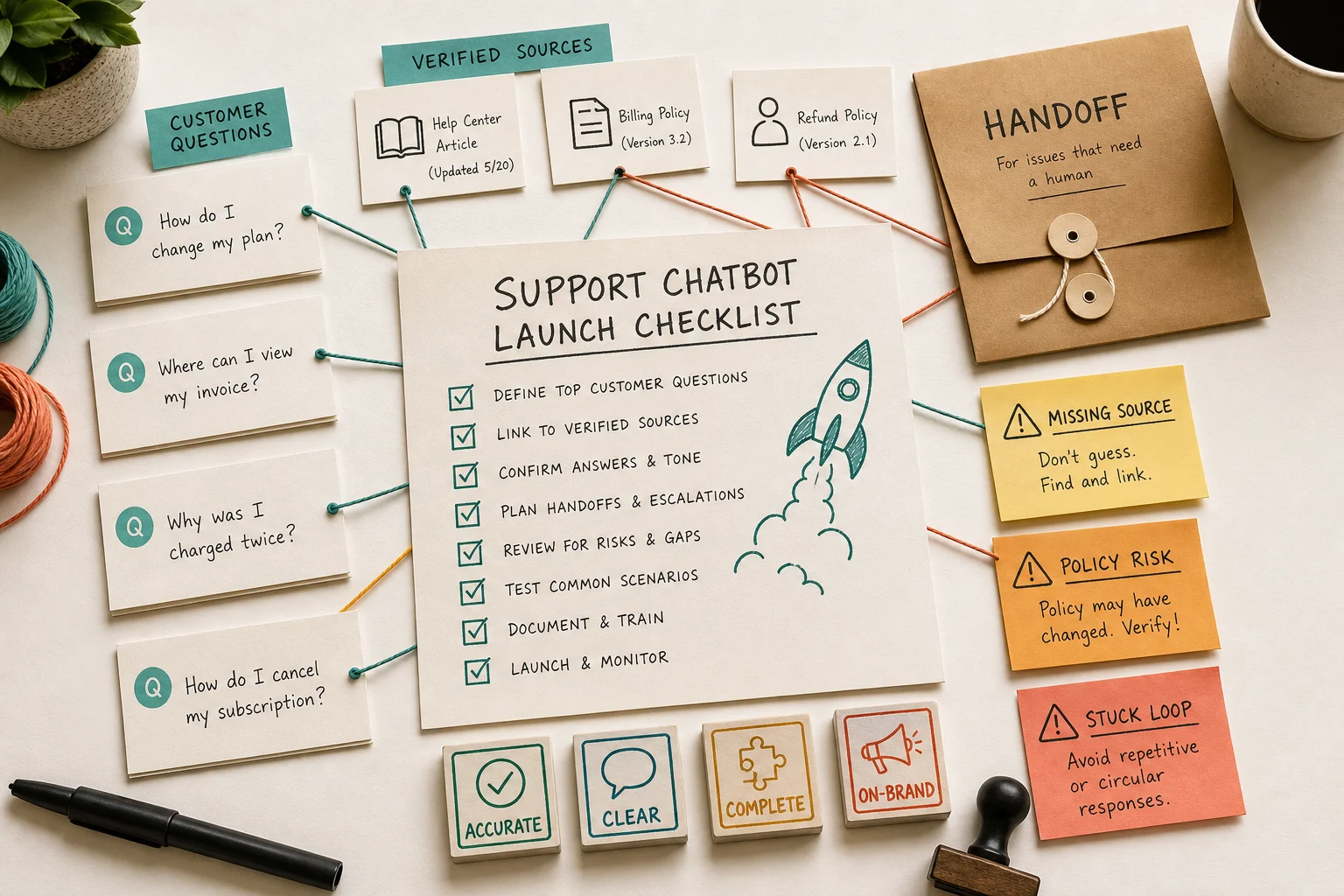
Most customer support chatbot mistakes happen before launch. The team trains the bot on weak sources, asks it to answer unsafe questions, then measures success by how many customers it keeps away from humans.
That is how a chatbot becomes a support liability. A good AI support launch needs trusted sources, explicit stop rules, clean handoff, and a review loop that keeps improving the answers after customers start using it.
This guide is for founders, support leads, and operators evaluating an AI chatbot for customer service, website support, or helpdesk automation. The first half is tool-agnostic. The second half explains where Owlish fits, because Owlish is our product.
The trust problem is not theoretical. Australia’s National AI Centre reported in May 2026 that around 65% of non-adopting SMEs cited distrust in AI decision-making or a preference to keep human control, while 19% said they did not know how to use AI in their business. It also found that customer-facing transparency and formal concern-raising processes lag behind internal output checks. AI.gov.au
That is the job of a launch checklist: make the AI useful without asking customers to trust a black box.
Customer support chatbot mistakes are usually operating mistakes
The obvious chatbot mistakes are easy to spot:
- it answers the wrong question
- it invents a policy
- it loops through clarifying questions
- it refuses when the answer is in the help center
- it makes the customer repeat everything to a human
Those failures look like model problems, but they usually start with operating decisions.
Chatbase’s 2026 failure guide makes the same broad point from a vendor angle: the most damaging AI customer support failures are often systemic, including missing escape routes, outdated training data, and measurement frameworks that reward deflection over resolution. Chatbase
The fix is not “buy a smarter model” and hope. The fix is to define what the bot is allowed to know, what it is allowed to do, when it must stop, and how your team will learn from every failure.
Mistake 1: training on content nobody owns
A chatbot trained on stale content will produce stale answers faster than your team can correct them.
Before launch, every source should have an owner. That includes help-center articles, pricing pages, returns policies, onboarding PDFs, setup guides, internal runbooks, and Direct Response-style FAQ entries.
For each source, write down:
- who owns the content
- when it was last reviewed
- what customer questions it should answer
- which questions it must not answer
- whether it is safe for public customer use
- how changes get into the chatbot
This is especially important for policy content. A refund rule, billing exception, account limit, warranty term, or cancellation deadline can be legally or commercially sensitive. If the source is ambiguous, the bot should not turn it into a confident answer.
Do not launch until someone can say, “This answer comes from that source, and that source is still true.”
Mistake 2: uploading everything because more context feels safer
More content does not automatically mean better answers.
Uploading old docs, duplicate policies, sales decks, archived FAQs, and internal notes can make retrieval worse. The bot may find the wrong version of a policy, cite a page that was never meant for customers, or blend two conflicting sources into one answer.
Start with a narrow support lane:
- one product area
- one customer segment
- one language
- one channel
- one set of safe question types
Then expand after you have reviewed real conversations.
SiteGPT’s customer support guide argues that modern website chatbot setup should be fast, but the durable lesson is not speed for its own sake. It is that setup should start from a clear source boundary: the website, files, and support content the bot is actually meant to use. SiteGPT
The mistake is treating the knowledge base like a junk drawer. The bot needs a source system, not a document pile.
Mistake 3: launching without a no-answer list
Every support chatbot needs a written list of topics it should not answer alone.
Good no-answer categories include:
- billing exceptions and refund disputes
- account ownership or identity questions
- legal, medical, financial, or safety advice
- security incidents and data-access concerns
- angry complaints
- anything requiring private account data the bot cannot verify
- anything where the source is missing, stale, or contradictory
This is not a sign that the chatbot is weak. It is how you keep the chatbot inside its lane.
Intercom’s May 2026 evaluation guidance recommends testing AI agents on multi-turn questions, vague inputs, edge cases, sensitive scenarios, multiple knowledge sources, and handoff behavior, not only accuracy on friendly examples. Intercom
That is the right bar. A launch test should include questions the bot should refuse.
Mistake 4: hiding the human exit
If a customer asks for a person, the bot should not make them negotiate.
Customer preference is more mixed than “everyone wants AI” or “everyone hates bots.” CX Dive reported in May 2026 that 61% of consumers said they prefer live agents, but more than two-thirds of that group would switch to automated service if it could solve the issue. The same article said 79% of consumers see at least one customer service benefit from AI, such as faster resolution. CX Dive
The lesson is straightforward: customers will accept automation when it works, but they still want a reliable exit when it does not.
A good handoff path should pass:
- the customer’s latest question
- the conversation summary
- what the bot already tried
- sources used or missing
- risk flags, such as billing, privacy, complaint, or cancellation
- the reason the bot stopped
- a suggested first human reply
Do not make the customer start again. The handoff is part of the product.
Mistake 5: measuring deflection instead of resolved demand
Deflection is a dangerous primary metric.
If the dashboard says the bot handled 70% of conversations, that can mean two very different things:
- 70% of customers got the right answer and did not need a human
- 70% of customers gave up before reaching a human
The first is useful automation. The second is hidden churn.
Measure quality instead:
- Verified resolution rate. The customer got a correct answer from a current source.
- False answer rate. The bot answered when it should have refused.
- Late handoff rate. The bot waited too long to escalate.
- Repeat-contact rate. The customer came back for the same issue.
- Source-gap rate. The bot failed because your knowledge base was missing content.
- Human rescue quality. The operator had enough context to resolve the issue.
Zendesk’s May 2026 Relate announcement is a useful market signal here. The company framed its newer AI service platform around data, intelligence, knowledge, workflows, governance, quality scoring, and knowledge-gap improvement, not only classic chatbot deflection. Zendesk
That is where the category is going. Support leaders need to know whether the AI resolved the issue, not whether it kept the ticket count low for a day.
Mistake 6: giving the chatbot action permissions before answer quality is proven
Answering a public FAQ is one risk profile. Changing an order, issuing a refund, updating a subscription, or touching customer data is another.
Do not connect actions until the answer lane is stable.
Use a staged model:
- Answer only. The bot answers from approved public sources.
- Draft only. The bot drafts replies for human review.
- Lookup with limits. The bot can retrieve account-specific data but cannot change it.
- Action with approval. The bot suggests an action and a human confirms it.
- Autonomous action. Only for narrow, reversible, low-risk workflows with logs.
Microsoft WorkLab’s April 2026 essay on agent-ready software describes a shift from human-only interfaces toward systems where agents operate inside the software stack. The practical support takeaway is that prepared data, encoded business logic, and agent-usable workflows matter as much as the chat surface. Microsoft WorkLab
If the workflow is not ready for an agent, do not give the chatbot the keys.
Mistake 7: treating internal support like website chat
A website chatbot usually answers customers at the edge of your business. An internal Slack or Teams support bot answers employees, operators, partners, or customer-facing staff.
Those workflows need different rules.
Internal bots may need:
- private channel boundaries
- source-level permissions
- draft-only behavior for sensitive topics
- clearer ownership of posted answers
- a different tone than public customer chat
- stronger audit trails
Slack’s May 2026 Workflow Builder update gives a useful example: AI can triage incoming tickets by summarizing thread history and suggesting a response before an agent opens the case. Slack
That is not the same as letting a bot reply publicly to every customer. Internal AI support can be a great first use case because the human still owns the final answer.
Mistake 8: shipping without a transcript review habit
The first week after launch should be boring and structured.
Review a small sample every day:
- correct answers with correct citations
- correct answers with weak citations
- wrong answers
- refusals that should have been answers
- answers that should have been handoffs
- repeated questions after an AI answer
- angry or confused customer messages
- source gaps that need new content
Do not wait for a customer complaint. By the time a complaint reaches you, many quieter customers have already judged the experience.
AI.gov.au’s adoption report found that among businesses using AI, checking outputs before they affect customers is the most common safeguard, but customer transparency and concern-handling processes lag. AI.gov.au
Transcript review is the bridge between internal caution and customer-facing accountability.
Mistake 9: never turning failures into new sources
Every failed chatbot answer should create one of three outcomes:
- a better source
- a clearer no-answer rule
- a cleaner handoff path
If the bot failed because the source was missing, write the source.
If the bot failed because the source was ambiguous, rewrite it.
If the bot failed because the question should not be automated, add it to the no-answer list.
If the bot failed because the customer needed a human, fix the handoff summary.
This is where AI support becomes an operating system rather than a launch project. The chatbot shows you where your support knowledge is thin. The team turns that into better content, better rules, and better escalation.
A practical pre-launch checklist
Before you put a customer support chatbot in front of customers, check these items:
- The first use case is narrow and low-risk.
- Every source has an owner and last-reviewed date.
- Duplicate and outdated docs are excluded.
- The no-answer list is written.
- The bot refuses when no source exists.
- The handoff path is visible.
- Handoff passes transcript, source, and reason context.
- The test set includes real customer wording, typos, edge cases, and sensitive questions.
- Success metrics include quality, not only deflection.
- The first-week transcript review owner is named.
- There is a process for turning source gaps into new content.
If you cannot check these yet, delay launch or start with draft-only automation.
Where Owlish fits
Owlish is built for teams that want a customer support agent grounded in their own knowledge, with a practical path from public website chat to operator review.
You can use Owlish to:
- build an agent without code
- ingest websites, PDFs, DOCX, CSV, TXT, Markdown, and Direct Response entries
- show source citations in the web widget when citations are enabled
- deploy the web widget on every plan
- add human handoff on supported paid plans
- expand into Slack, Microsoft Teams, and Google Chat on Growth and above
The important part is not that Owlish makes setup easy. The important part is that it keeps the source, answer, and handoff workflow close together.
Owlish is not the best fit if you need a full enterprise contact center suite, native phone support, a heavily customized CRM automation layer, or a system that can take high-risk account actions on day one. In those cases, look for a broader service platform or start with a human-reviewed workflow first.
If your first goal is a trustworthy website support agent that answers from your docs, cites sources, and hands off when it should stop, Owlish is a good fit.
FAQ
What is the biggest customer support chatbot mistake?
The biggest mistake is letting the chatbot answer without a reliable source and a clear stop rule. A fast wrong answer is worse than a slower human answer because it creates a screenshot, a complaint, and a trust problem.
How do you test a customer support chatbot before launch?
Test it with real support questions, not only clean demo prompts. Include typos, vague wording, policy boundaries, billing questions, complaints, and questions your docs do not answer. Score answer accuracy, citation quality, refusal quality, and handoff quality separately.
Should an AI chatbot answer billing questions?
It can answer general billing questions if the answer is backed by a current public source. It should not decide account-specific exceptions, refund disputes, identity questions, or high-impact billing changes unless your workflow has verified account context, permissions, logs, and human approval where needed.
How often should support chatbot sources be reviewed?
Review high-risk sources monthly, including pricing, refunds, cancellations, security, privacy, shipping, warranty, and account limits. Review lower-risk setup docs when the product changes. Review failed chatbot conversations weekly while the bot is new.
What metrics matter more than chatbot deflection?
Track verified resolution rate, false answer rate, late handoff rate, repeat-contact rate, source-gap rate, and customer satisfaction after AI-only answers and AI-to-human handoffs. Deflection is useful only when customers actually get the right outcome.
Start with trust, then scale
The safest chatbot launch is not the biggest launch. It is the one where the bot knows its lane, cites its sources, and hands off before it damages trust.
If you want to build that kind of support agent, start with Owlish. Add your website or support docs, test the questions customers already ask, and turn the gaps into better sources before you widen the rollout.