AI email support is safe only when it is a routing policy, not a switch that lets a bot answer every message in support@. Start by deciding which messages it should ignore, answer from an approved source, draft for review, or hand off — then test the whole path with real threads before it sends to customers.
That distinction matters because email has different failure modes from web chat. A wrong reply can sit in a customer’s inbox, a forwarded message can change reply behaviour, and an auto-responder can turn a bad configuration into a loop. This guide shows how to run a controlled email-support pilot without giving up your existing inbox.
Email AI needs a send policy, not just a good prompt
The useful question is not “can the agent write an email?” It can. The useful question is “under what conditions may it send one without a person reading it first?”
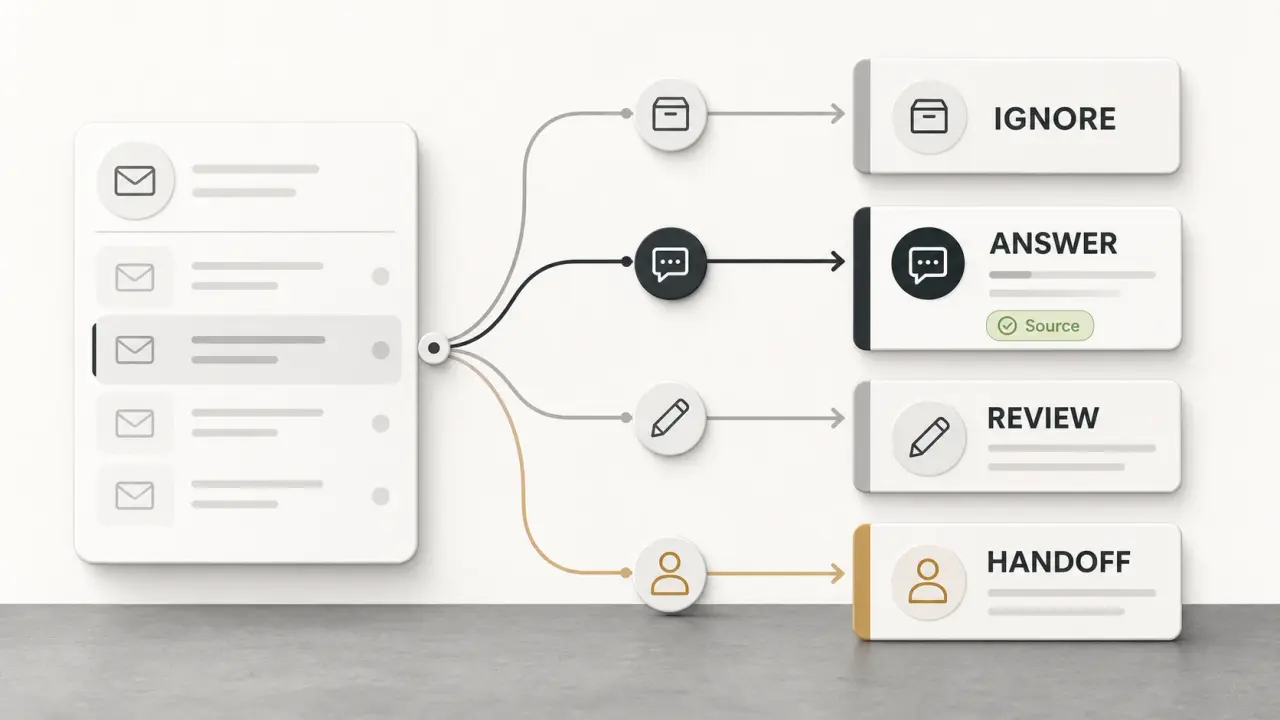
For every incoming support email, make the system choose one of four outcomes:
- Ignore — no reply from AI.
- Answer — send a short response grounded in an approved source.
- Review — prepare a draft for a human to approve or edit.
- Handoff — route the message to a named person or queue with the context they need.
This is the Email Reply Ladder. It is deliberately less ambitious than “automate the inbox,” because the middle of an inbox is where the risk lives. A clear policy also gives your team something practical to audit: not whether the reply sounded polished, but whether it entered the right lane.
Build the four email-reply lanes before you connect an inbox
Lane 1: Ignore mail that should never start a support conversation
Keep automated acknowledgements, out-of-office replies, newsletters, mailing-list traffic, delivery notices, and failed authentication out of the reply path. These are not customer questions; replying to them adds noise at best and creates a loop at worst.
Owlish’s Email channel is designed to ignore auto-responders, out-of-office replies, bulk mail, and messages that fail sender authentication. That guardrail is useful, but do not treat it as a reason to skip your own test. Send an out-of-office reply and a test newsletter through the exact forwarding path you will use, then confirm neither receives an AI answer. See the Email deployment guide for the product behaviour.
Lane 2: Auto-send only short, stable, source-backed answers
An email belongs in the send lane only when all three checks pass:
- Scope: it asks for information, not a decision or a change to a customer’s account.
- Source: one current, approved page or document directly supports the answer.
- Stakes: a wrong answer would be inconvenient, not financially, legally, or security consequential.
Good candidates include “Where is your installation guide?”, “What are your standard shipping times?”, or “How do I reset my password?” — but only if the public source is current and the reply cites or links to it. Keep the answer compact enough that the customer can verify it without trusting a paragraph of generated prose.
Do not auto-send simply because the agent found a related article. A loose source match is a review case, not an answer case. Turn on and inspect citations before you enable sending; a citation is the fastest way to see whether the system used the right policy, not merely a plausible one.
Lane 3: Draft when the answer is almost safe but needs judgment
Use review for the ambiguous middle: a question that has a relevant source but unclear customer context, an answer that combines two policies, a frustrated tone, or wording you want a person to tailor before sending.
Typical draft-only examples include:
- A customer asks whether an exception is possible, even though the standard policy is documented.
- A customer wants help choosing between plans or products.
- The agent found two sources that appear to conflict.
- The email includes a personal circumstance that changes how the right answer should be expressed.
Drafting still saves time. The human starts with the source and a structured response instead of a blank reply, while retaining the judgment that makes a support promise safe.
Lane 4: Hand off high-stakes, account-specific, or unresolved messages early
Put these in a no-auto-send list before launch:
- refund requests, billing disputes, cancellations, chargebacks, or payments;
- legal, privacy, security, accessibility, and compliance questions beyond your published statement;
- account-specific status, order details, entitlement changes, or anything that needs live data the agent cannot see;
- complaints, threats, repeated contacts, or an explicit request for a person;
- a message the agent cannot ground in a current source.
The agent can acknowledge the request and explain the documented part, but it should not make a binding decision. A good handoff includes the original email, a short summary, the sources checked, why automation stopped, and the intended owner. That is the difference between handing work to a person and making the customer repeat themselves. Owlish’s human-handoff flow is built around preserving that context.
Prepare the source set and the no-send list together
Do not train an email agent on a dump of old tickets and call it ready. Start with sources you would be comfortable linking in a reply:
- current help-centre articles and product documentation;
- shipping, returns, refund, or service policies with an owner and review date;
- pricing and plan pages that match what customers can buy today;
- short, approved direct answers for recurring questions that do not have a full article yet.
Then write the no-send list next to those sources. It should name topics, not just say “be careful”: refunds, promises about delivery, account changes, security claims, medical or legal issues, discounts, and incident reporting are common starting points. The exact list depends on your business, but a named rule is testable in a way that “use good judgment” is not.
If a policy changes often, assign an owner and re-sync the source before relying on it. Owlish re-syncs website sources on the schedule you set, and the next answer uses the updated content after the re-sync completes. The citation and re-training guide explains how to diagnose a source that is stale, missing, or losing to the wrong result.
Keep support@ in place and prove forwarding works first
You do not need to move your mailbox or change MX records to test an email-support agent. With Owlish, the normal pattern is to keep support@yourcompany.com, forward incoming messages to the agent’s address, and let the agent reply in the original conversation. The full connection and custom-domain steps are in the Email deployment guide.
Treat forwarding as a small migration with a rollback, not a checkbox:
- Create a test address or a narrow label/filter before you forward the whole inbox.
- Send one plain-text question, one HTML email, one reply in an existing thread, one message with an attachment, and one out-of-office response.
- Confirm the original inbox retains the expected copy, the agent sees the right content, and the customer-facing reply arrives in the intended thread.
- Check that a handoff reaches a human with the original message and reason for escalation.
- Turn the forwarding rule off, then repeat one test. A rollback that you have not tested is only a hope.
Gmail requires you to verify a forwarding address before it can forward mail. It can forward all new non-spam mail or use filters for selected messages, and it recommends keeping the Gmail copy in the inbox. Google’s forwarding instructions are the source of truth for the current steps.
For Outlook, the word redirect is not interchangeable with forward. Microsoft says a forwarded message appears to come from the mailbox doing the forwarding, whereas a redirected message preserves the original sender and sends replies to that sender. Test the exact Outlook rule you choose with a real reply thread before enabling it for the whole queue.
Make delivery and authentication part of the launch checklist
It is tempting to assess the pilot only by answer quality. That misses a basic email risk: forwarding can affect authentication and delivery.
Google’s administrator guidance says forwarded messages can fail SPF authentication and recommends SPF plus DKIM. It also warns that modifying protected content or headers can break DKIM. Review those forwarding rules with whoever owns your sending domain before you make a broad routing change.
Keep this operational rather than theoretical:
- Send test messages from a Gmail address, Outlook address, and a domain outside your company.
- Verify the From name, reply-to path, thread placement, and disclosure line that the customer sees.
- Watch bounces and complaints during the pilot, not after a month of automation. Owlish surfaces recent delivery-health signals in the Email channel panel.
- Do not quietly rewrite an email subject or body in the forwarding layer to “help” the agent. Preserve the original message so both the thread and the authentication path behave predictably.
If you use a custom sending domain, follow the provider’s DNS instructions and wait for verification before you turn the pilot up. Brand consistency is not worth a broken reply path.
Run a 25-thread pilot before broadening the rule
The right first milestone is not a deflection percentage. It is 25 reviewed, real threads in which each email entered the correct lane.
Start small: a trusted queue, a subset of the inbox, or a narrow intent such as product documentation questions. Review every one of the first 25 threads with the same five questions:
- Was the email routed to ignore, answer, review, or handoff correctly?
- If it answered, did the cited source directly support the claim?
- If it drafted, did a human have to correct a factual statement or only adjust tone?
- If it handed off, did the operator have enough context to reply without asking the customer to repeat themselves?
- Did the reply remain in the intended conversation and avoid an auto-response loop?
Fix the workflow before increasing volume. A recurring handoff reason is often a knowledge-base gap; a cited but wrong answer is usually a stale or competing source; and a good answer sent in the wrong thread is an email-routing bug, not a model-quality problem. For a broader approach to deciding what to automate first, see Support Ticket Automation: What to Automate First.
Where Owlish fits for AI email support
Owlish is a no-code AI customer-support platform for teams that want grounded replies, visible sources, and a real path to a person. Its Email channel is available on Growth and above: it gives an agent an address, lets you forward an existing support inbox, keeps replies threaded, and can send from your own domain once its DNS setup is verified. The same source library, brand settings, and citations can support the web widget and your support inbox.
It is a good fit when your repetitive email questions are answerable from current documentation, policies, websites, PDFs, or approved direct responses — and your team wants the agent to stop cleanly when it reaches an exception.
It is not the right tool to decide a refund, inspect a customer’s live order or account without that data being available, replace a full enterprise ticketing suite, or make nuanced legal and security commitments. Keep those cases in the handoff lane.
AI email support launch checklist
Before switching on automatic replies, confirm that you have:
- one named owner for each source that can change;
- a written four-lane policy and no-send list;
- citations enabled and checked on the top repeat questions;
- a reversible Gmail or Outlook forwarding rule;
- test results for a new email, threaded reply, attachment, auto-responder, and handoff;
- a verified sending domain and a person watching delivery health;
- a 25-thread review gate before expanding scope.
FAQ
What support emails should AI never answer automatically?
Do not auto-send replies about refunds, billing disputes, cancellations, account-specific information, security or legal commitments, and unresolved complaints. The agent can acknowledge the message and provide a documented policy link, but a person should own the decision.
Should I use forward or redirect for Outlook support email?
Test both only if your provider supports them. Microsoft documents that forwarding changes how the message appears and where replies go, while redirecting preserves the original sender and reply path. The correct choice is the one that keeps your customer conversation intact in your actual setup, not the one with the more intuitive label.
Can an AI email agent keep the customer in the same conversation?
It should. Verify this in a test thread before you go live. Owlish is designed to reply onto the original conversation, but mailbox rules and your sending-domain configuration still need a real end-to-end test.
How do I know whether the pilot is working?
Read the first 25 real threads. Track correct routing, source-supported answers, factual edits required on drafts, handoff quality, bounces or complaints, and repeat contacts. A raw count of emails answered is not enough.
Start with one safe email lane
The best first email automation is not the broadest one. Choose a small set of stable, documented questions, require a source for every answer, and make a person easy to reach when the message needs judgment.
To try that workflow in Owlish, build an agent from your approved support sources, test the answer and handoff paths, then connect the Email channel when the four lanes are written down.
Sources
- Google Gmail Help — Automatically forward Gmail messages
- Google Gmail Help — Best practices for forwarding email to Gmail
- Microsoft Support — Use rules to automatically forward messages
- Zendesk Help — Creating an AI agent to automatically resolve customer issues
- Owlish Email deployment guide
- Owlish citations and re-training guide
- Owlish human handoff guide